Kollus MCP Server Beta Launch and Feature Overview
This document is a machine-translated draft and is currently undergoing review. Some content may be inaccurate or differ from the original Korean version. For the most precise information, refer to the Korean documentation.
✨ What is the Kollus mcp server?
The Kollus MCP server is a remote MCP server that enables AI coding agents such as Claude Code and Codex to leverage Kollus VOD/Live APIs, official guides, and sample code using natural language. When a developer asks a question in natural language within their development environment, the AI agent searches for information and provides an answer.
🛠️ Background and motivation
Previously, when customer developers integrated Kollus services, official guides, API specifications, and sample code were scattered across different locations, making information retrieval time-consuming. For example, verifying topics such as "DRM callback validation methods," "player JWT validity checks," or "the meaning of error code -2106" required individually searching through documentation or waiting for a Technical Support response each time.
Now, by connecting the Kollus MCP server to an AI coding agent, the agent instantly searches Kollus documentation and calls APIs to provide contextually relevant answers in real time the moment a developer asks a question in natural language.
Key benefits (from the customer development team's perspective)
- Improved integration productivity and reduced wait times: The AI agent immediately searches official guides, API specifications, sample code, and anti-patterns, reducing trial and error.
- Minimized context switching: API response results and JWT validation results are available directly within the development tool, eliminating the need to switch between the web console and code editor.
- Streamlined technical support: The AI agent handles common integration-related queries as the first line of response, reducing wait times for Technical Support inquiries.
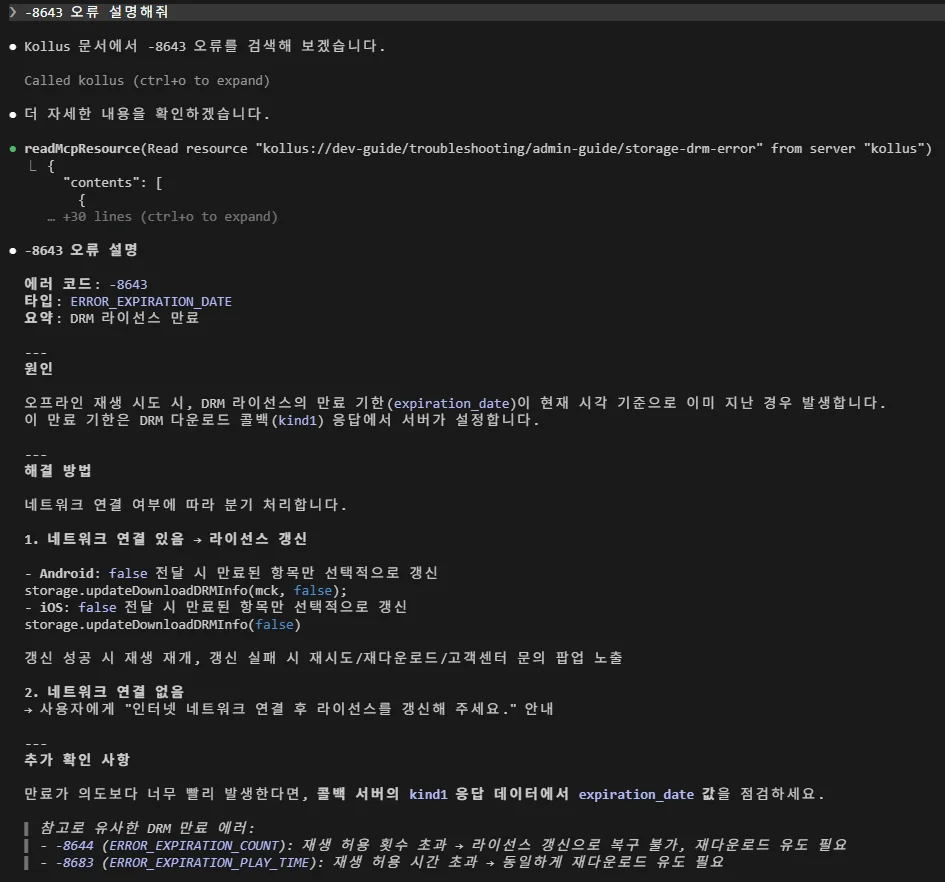
Usage examples (from a developer's perspective)
After connecting the MCP server, you can ask questions in natural language in the AI agent's chat window to perform tasks like the following.
Example question 1: "Tell me about the DRM download callback kind 1 response fields."
AI action: Searches the Kollus official guide and returns the field specifications
Example question 2: "What is the encoding progress of the video with
upload_file_key=xxx?"
AI action: Queries the video's detailed metadata via the Kollus VOD API and returns the result
Example question 3: "Is this JWT valid?
eyJhbGciOiJIUzI1NiI..."
AI action: Validates the signature, expiration time, and DRM type locally and provides a report
Example question 4: "Show me the daily viewing statistics for this month."
AI action: Calls the Kollus statistics API and summarizes the daily viewing data
📋 Feature specifications
These are the main feature areas provided by the Kollus MCP server. For security, all tools are read-only by default, and tools requiring write permissions are provided in a limited manner after rigorous security review.
| Feature area | Description and available actions |
|---|---|
| Documentation search | Supports keyword search across official guides, API specifications, sample code, error codes, and anti-pattern documentation. |
| VOD queries | Retrieves video lists, detailed metadata, categories, channels, encoding profiles, and viewing statistics and rankings in real time via Kollus VOD API calls. |
| Live queries | Supports retrieval of live channel information, broadcast status, real-time viewer count statistics, and recording file lists, and issues download URLs via Kollus Live API calls. |
| JWT validation | Validates the signature, expiration date, and DRM type of JWTs for VOD players and live broadcasts. Validation is performed securely in a local virtual environment without any external network calls. |
| Technical support | Submits support tickets directly to the Kollus Technical Support team. |
🔐 Security design
The Kollus MCP server does not store customer credentials on the server.
- All secret keys, including Access Tokens and security keys, are encrypted in the form of client-side tokens (Blobs) and transmitted with every request.
- No authentication information is stored on the MCP server's disk or database.
🌏 Multi-region support
Kollus operates two regions: KR(Global) and JP.
- API call tools accept region information as a parameter, with KR as the default.
- The AI agent analyzes the user's context and automatically calls the API for the appropriate region.
💡 Get started
The Kollus MCP server beta version will be available starting June 22, 2026.
1. prerequisites (verify authentication keys)
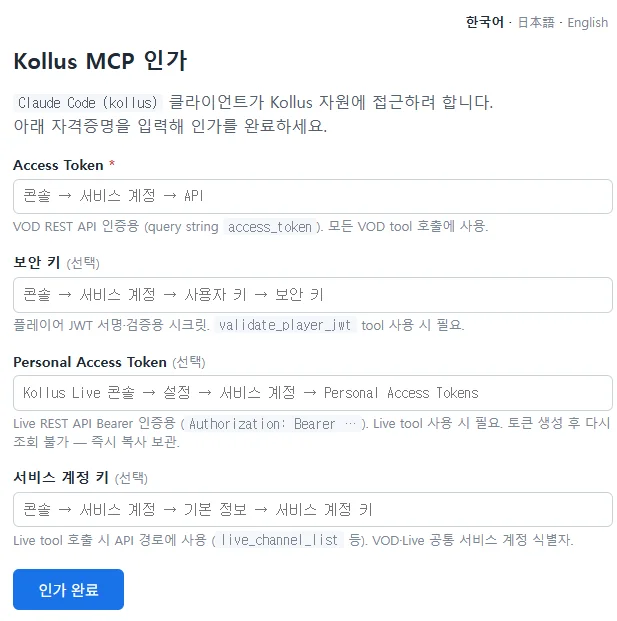
Obtain the following authentication keys from the Kollus console in advance, depending on the features you intend to use.
| Authentication key name | Where to find | Required |
|---|---|---|
| VOD Access Token | Kollus VOD console > [Settings] > [API] | Required |
| Security Key | Kollus VOD console > [Settings] > [Custom key] > [Security key] | Required when using the JWT validation feature |
| Live Personal Access Token | Kollus Live console > [Settings] > [Basic information] > [Service account] tab > [Personal Access Tokens] at the bottom | Required when using Live features |
| Service account key | Kollus Live console > [Settings] > [Basic information] > [Service account] tab > [Service account key] | Required when using Live features |
2. registration by AI agent
- Register with Claude Code
claude mcp add --transport http kollus https://mcp.kollus.com/mcp-beta
- Register with Codex
codex mcp add kollus --url https://mcp.kollus.com/mcp-beta
When connecting for the first time after registration, an OAuth 2.1 authentication page will open in your browser. Other AI coding agents that support the OAuth 2.1 standard can also be integrated using the URL above.
3. Kollus mcp authentication
Values you enter are stored only in the client-side token and are never saved on the server.
💬 Contact us
For inquiries related to using the Kollus MCP server, please contact us through the technical support channel below.
- Technical Support: tech_support@kollus.com