Live Playback Callback
Notice
This document is a machine-translated draft and is currently undergoing review. Some content may be inaccurate or differ from the original Korean version. For the most precise information, refer to the Korean documentation.
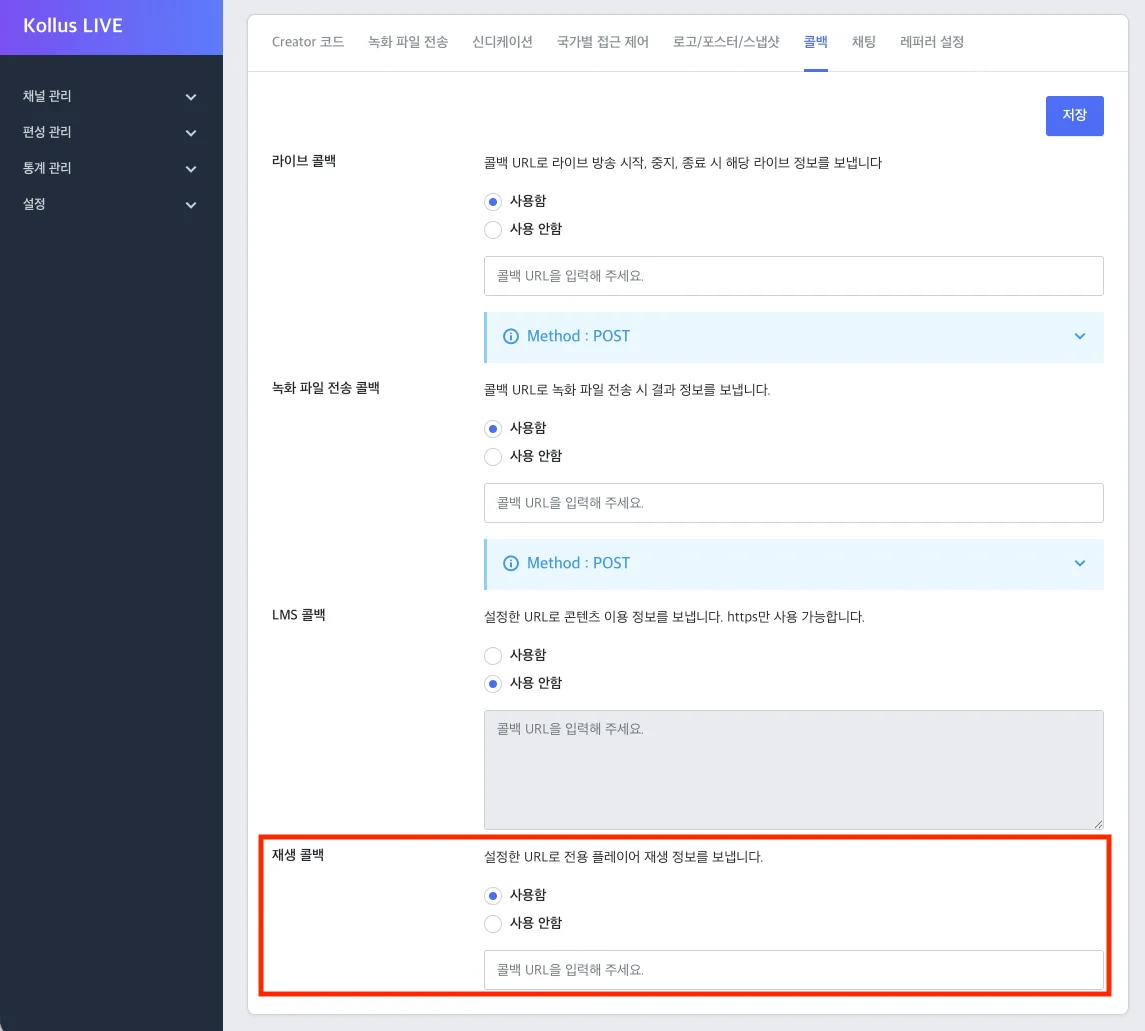
Playback Callback (Play Callback) is called in real time when a user requests live playback from the player. Live viewing is only available when a normal response is received from the callback server.
How to configure the callback
The callback URL can be configured independently for each channel.
Caution
The playback callback only works when using the Kollus secure player, not the standard HTML5-based player. Even if a URL is configured on a channel where the Kollus secure player is not applied, the callback will not be triggered.
- Go to Kollus Live console > [Channel] > [Channel list].
- Depending on your situation, choose one of the following:
- When creating a new channel: Click [Register channel] in the upper right corner.
- When configuring an existing channel: Click [Edit] on the right side of the target channel.
- In the [Callback] tab at the bottom, enter the playback callback URL and click [Save].
Request
Transmission method
- Method:
POST - Content-Type:
application/x-www-form-urlencoded - Data Format:
FormData
Request parameters
| Parameter | Type | Description |
|---|---|---|
kind | integer | 100 (fixed value for live playback callback) |
client_user_id | string | User ID (the client_user_id entered when generating the JWT) |
player_id | string | Kollus Player unique ID |
hardware_id | string | Hardware ID (provided when an identifiable value exists, such as in a Windows environment) |
device_name | string | Device model name |
media_content_key | string | Live broadcast key |
channel_key | string | Channel key |
uservalues | JSON string | Custom variables (uservalue0 to uservalue99) |
localtime | integer | Device time at the time of the request (Unix timestamp) |
Uservalues example
{
  "uservalue0": "class_code_01",
  "uservalue1": "product_code_02",
  ...,
  "uservalue99": "custom_code_03"
}
Response fields
Data items
| Field | Type | Description |
|---|---|---|
result | integer |
|
message | string | Message to display in the player when result is 0 |
vmcheck | integer | (HTML5 Player for PC only) Whether to allow playback in a virtual machine (VM) environment
|
disable_tvout | integer | TV output restriction setting (takes priority over the channel's default policy)
|
Response example
{
  "data": {
    "result": 1,
    "vmcheck": 0,
    "disable_tvout": 1
  }
}