Generate Secure Live View URL (JWT)
This document is a machine-translated draft and is currently undergoing review. Some content may be inaccurate or differ from the original Korean version. For the most precise information, refer to the Korean documentation.
To apply security features to a live stream, a valid JWT (JSON Web Token) must be generated on the customer server and passed when calling the player.
This document describes the detailed JWT specifications for restricting live stream viewing to authorized users only and applying security features such as concurrent playback prevention.
JWT technical specifications
Encryption algorithm
Kollus Live supports only the HMAC SHA-256 (HS256) algorithm.
Header: { "alg": "HS256", "typ": "JWT" }
Authentication keys
The following two keys are used when generating and calling the JWT.
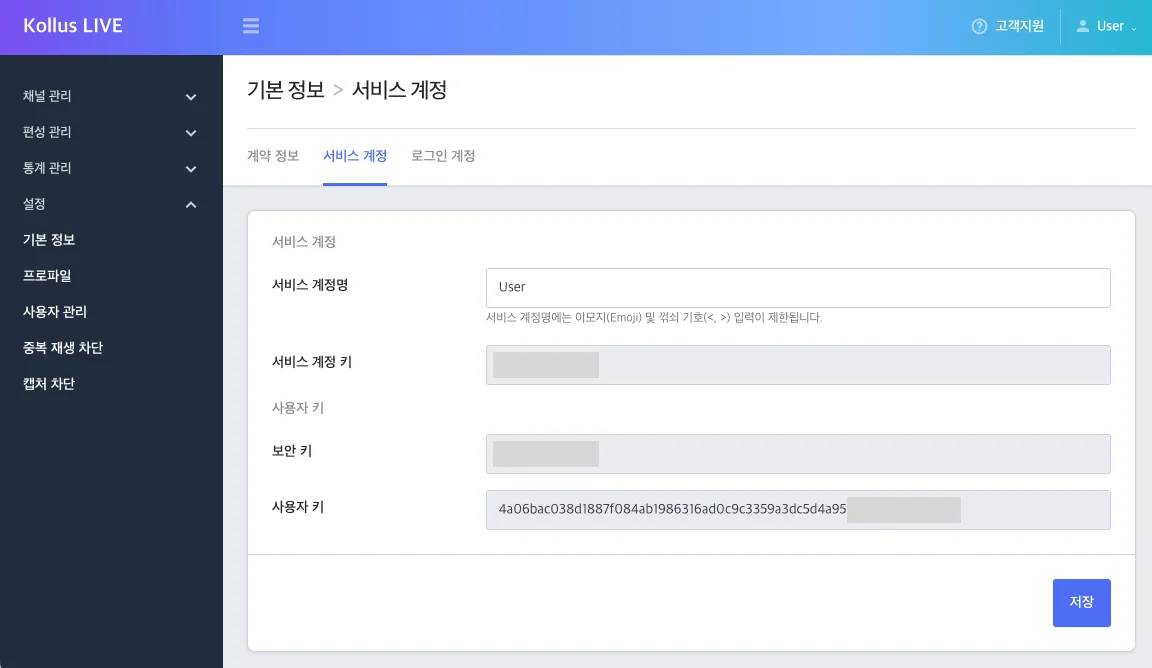
security key
- Description: A secret key used for JWT signing and verification. Be careful not to expose it externally.
- Where to find: Kollus Live console > [Settings] > [Basic information] > [Service account] tab
- Changing the security key: Contact Technical Support (tech_support@kollus.com).
Custom key (custom_key)
- Description: An encrypted value of the security key, used together with the security key for authentication (JWT).
- Where to find: Kollus Live console > [Settings] > [Basic information] > [Service account] tab
Request URL format
https://v-live-kr.kollus.com/s?jwt={JWT}&custom_key={CUSTOM_KEY}
- Standard Claim Usage Restrictions: Errors may occur when using Claims defined in the RFC 7519 - Registered Claim Names specification.
- Enabling Watermarking: The watermarking feature is disabled by default. To enable it, contact Technical Support (tech_support@kollus.com) or Account Manager.
- iOS Full Screen Mode: When switching to full screen on iOS, the iOS Native player is launched.
- Feature Restriction Environments: When playing in full screen on iOS or Samsung Browser, Kollus Player features such as watermark display may be restricted.
JWT payload detailed specifications
Required options example
This is the basic Payload structure for a user (catenoid) to watch a specific channel (vouww6hjt9xy9dnV).
{
  "client_user_id": "catenoid",
  "expire_time": 1893455999,
  "live_media_channel_key": "vouww6hjt9xy9dnV"
}
Basic options
For key information, refer to the Authentication and Keys document.
| Option | Type | Required | Default | Description |
|---|---|---|---|---|
client_user_id (cuid) | string | ◯ | - | User ID
|
expire_time (expt) | integer | ◯ | - | JWT expiration date/time (Unix timestamp)
|
live_media_channel_key (lmckey) | string | ◯ | - | Unique channel identifier (channel key) |
client_user_name | string | - | - | User's nickname to be displayed in the chat window |
client_user_image | string | - | - | Image URL to be displayed next to the nickname (https required) |
play_expt | integer | - | Current time + 2 days | Valid access time for the live stream |
live_media_profile_key (lmpf) | string | - | - | Encoding profile key (ABR applied if not specified) |
title | string | - | - | Broadcast title to be displayed in the player (existing broadcast title is displayed if not specified) |
Chatting options
| Option | Type | Default | Description |
|---|---|---|---|
chatting_policy.is_visible | boolean | true | Whether to display the chat window |
chatting_policy.is_admin | boolean | false | Whether to grant chatting administrator privileges |
chatting_policy.position | string | right | Chat window position (left or right) |
Chatting UI options
| Option | Type | Default | Description |
|---|---|---|---|
chat_font_url | string | - | Web font URL (only 1 supported; check supported extensions per browser) |
chat_font_name | string | - | Font name (30 characters or less; recommended to match the name included in chat_font_url) |
chat_font_weight | string | - | Font weight (only weights included in chat_font_url are applied) |
chat_font_color | string | - | Chat text color (hex) |
chat_background_color | string | - | Chat window background color (hex) |
chat_tab_font_color | string | - | Chat window tab menu text color (hex) |
chat_tab_background_color | string | - | Chat window tab menu background color (hex) |
Watermarking
Overlays user identification information on the screen to prevent unauthorized recording and leakage.
- Enabling the Feature: The watermarking feature is disabled by default. To enable it, contact Technical Support (tech_support@kollus.com) or Account Manager.
- Tamper Prevention: Protection against watermark tampering via external scripts (JavaScript Injection) is applied by default.
| Option | Type | Default | Description |
|---|---|---|---|
video_watermarking_code_policy.code_kind | string | - | Watermark display text
|
video_watermarking_code_policy.font_size | integer | 7 | Watermark text size (px) |
video_watermarking_code_policy.font_color | string | "FFFFFF" | Watermark color (hex) |
video_watermarking_code_policy.alpha | integer | 200 | Watermark opacity (0 to 255) |
video_watermarking_code_policy.show_time | integer | 1 | Watermark display duration (sec) |
video_watermarking_code_policy.hide_time | integer | 60 | Watermark hidden duration (sec) |
video_watermarking_code_policy.enable_html5_player | boolean | false | Whether to use Kollus Web Player
|
Usage examples
Customizing chatting features
{
    "client_user_id": "catenoid",
    "client_user_name": "guest_1",
    "expire_time": 1893455999,
    "live_media_channel_key": "vouww6hjt9xy9dnV",
    "chatting_policy": {
        "is_visible": true,
        "is_admin": false,
        "position": "right"
    },
    "chat_font_weight": "700",
    "chat_font_color": "ffffff",
    "chat_background_color": "333333",
    "chat_tab_font_color": "00ff00",
    "chat_tab_background_color": "777777"
}
Applying watermarking
{
    "client_user_id": "catenoid",
    "live_media_channel_key": "vouww6hjt9xy9dnV",
    "expire_time": 1893455999,
    "client_user_name": "guest_1",
    "video_watermarking_code_policy": {
        "code_kind": "catenoid",
        "font_size": 7,
        "font_color": "FFFFFF",
        "show_time": 1,
        "hide_time": 500,
        "alpha": 50,
        "enable_html5_player": false
    }
}