KollusAgent is not installed
- Error message: "KollusAgent is not installed. Click the download button to install it."
- Summary: Secure content cannot be played because KollusAgent is not installed or the browser's local network permission is blocked
Symptoms
When launching the video player, the message above is displayed and content playback is blocked.
Solutions by cause
When KollusAgent is not installed
- Click the [Download] button at the bottom of the message.
- Open the downloaded executable file and complete the KollusAgent installation.
- Return to the browser playback screen, refresh the page, and play the video again.
(macOS) When playback is blocked even after installing KollusAgent
If local network access permission is blocked in Chrome or Edge on macOS, the same message may be displayed even when KollusAgent is installed. In this case, you can resolve the issue by changing only the browser permission settings, without reinstalling.
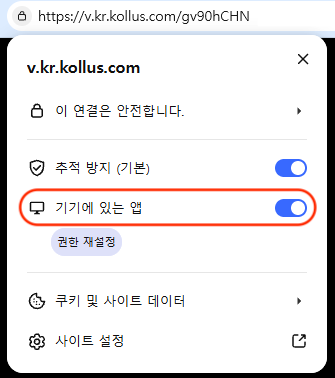
- Click the Site information icon on the left side of the browser address bar.
- Turn on the permission according to your browser version.
- Chrome/Edge 145 or later: Turn on the 'Apps on device' toggle.
- Chrome/Edge 141 to below 145: Change 'Local network access' to [Allow].
- Chrome/Edge 145 or later: Turn on the 'Apps on device' toggle.
- Refresh the page and play the video again.
If the permission item does not appear in the site information icon
- Enter the address below in the browser address bar and press [Enter].
- Chrome:
chrome://settings/content/localNetwork - Edge:
edge://settings/content/localNetwork
- Chrome:
- Find the site in the blocked list, change it to [Allow], and then refresh the page.