Upload API
This document is a machine-translated draft and is currently undergoing review. Some content may be inaccurate or differ from the original Korean version. For the most precise information, refer to the Korean documentation.
Customers can use the Upload API to implement content upload functionality directly within their website.
The customer server uses the Upload API to obtain a one-time upload URL and upload file key to build the upload page. When a customer administrator selects a file in the browser, the file is transmitted to the Kollus upload server.
Notes
- One-time session: The issued upload URL and upload file key can only be used once.
- Expiration policy: Once the specified validity period has elapsed, the session is immediately invalidated.
- Security: Ensure that all tokens and key information issued during API calls are not exposed externally.
Upload flow
- Access the upload page: The customer administrator accesses the video upload menu on their own website.
- Generate upload URL: The customer server calls the Upload API to obtain the upload URL, upload file key, and expiration date and time.
- Build upload page: The customer server uses the received information to build a UI for file selection and transfer.
- Transfer file: When the customer administrator uploads a file, it is transmitted to the Kollus upload server. You can track progress in real time.
Upload URL generation API
This API issues a one-time upload URL to be used when transferring files from the upload page.
Request specifications
Delivery method
| Item | Details |
|---|---|
| Method | POST |
| Protocol | HTTP(80), HTTPS(443) |
| Endpoint |
|
| Auth | Query parameter kollus_api_access_token (authentication token) must be included
|
Request body
Construct the body in JSON format.
| Parameter | Type | Default | Description |
|---|---|---|---|
expire_time | integer | 600 | Upload URL validity period
|
category_key | string | - | Category key where the uploaded file will be stored (if not specified, stored in the 'Default' category)
|
title | string | - | Content title (if not specified, the file name is used) For passthrough upload, the original file name is forcibly applied. |
is_encryption_upload | integer | 0 | Whether to encrypt content
|
is_audio_upload | integer | 0 | Upload file type
|
is_passthrough | integer | 0 | Upload method
|
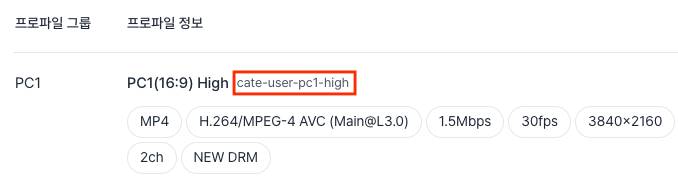
profile_key | string | - | (Required for passthrough upload) Encoding profile key
|
Request example
{
  "expire_time": 600,
  "category_key": "abcd1234",
  "title": "My Video",
  "is_encryption_upload": 0,
  "is_audio_upload": 0
}
Response specifications
The Upload URL generation API response follows the application/json; charset=UTF-8 format.
Note that the response object name differs depending on the upload method (standard/passthrough), so take care during implementation.
Standard upload response fields
| Field | Description |
|---|---|
data | Object containing upload session information |
data.upload_url | Upload server URL |
data.progress_url | Upload progress inquiry URL |
data.upload_file_key | Upload file key |
data.expired_at | Upload file key expiration date and time (Unix timestamp) |
Standard upload response example
{
  "error": 0,
  "message": "",
  "data": {
    "upload_url": "https://upload.kr.kollus.com/api/v1/UploadMultiParts/KUS_S5yb4bgc5aGquWzhatk1cOAo9zTZnAv7/20151218-oyn7ytrh",
    "progress_url": "https://upload.kr.kollus.com/api/v1/GetUploadingProgress/KUS_S5yb4bgc5aGquWzhatk1cOAo9zTZnAv7",
    "upload_file_key": "20151218-oyn7ytrh",
    "expired_at": 1413883670
  }
}
Passthrough upload response fields
| Field | Description |
|---|---|
error | Processing result (0: success) |
message | Error message (empty string on success) |
result | Object containing passthrough upload session information |
result.upload_url | Upload server URL |
result.progress_url | Upload progress inquiry URL |
result.upload_file_key | Upload file key |
result.will_be_expired_at | Upload file key expiration date and time (Unix timestamp) |
Passthrough upload response example
{
  "error": 0,
  "message": "",
  "result": {
    "upload_url": "https://upload.kr.kollus.com/api/v1/UploadMultiParts/KUS_BOHG2eTQhPSIaG2511G1jfkpWOYAOjDc/20151204-dh6o2goz",
    "progress_url": "https://upload.kr.kollus.com/api/v1/GetUploadingProgress/KUS_BOHG2eTQhPSIaG2511G1jfkpWOYAOjDc",
    "upload_file_key": "20141017-y4sae7td",
    "will_be_expired_at": 1413883670
  }
}
File upload
Specify the issued upload_url as the endpoint and use HTML multipart/form-data format to transfer the actual file.
- Fixed parameter key: The
nameattribute of the fileinputelement must be set toupload-file. - Single file restriction: One
upload_urlcan only transfer one file. (multiple transfers will result in failure) - Success criteria: The file transfer must be completed before the URL expiration date and time for the upload to be considered successful. When uploading large files, set
expire_timesufficiently long to account for network conditions.
Request specifications
Request body
| Parameter | Type | Default | Description |
|---|---|---|---|
return_url | string | - | URL to redirect to after upload is complete The result values result and message are appended as query strings.
|
disable_alert | integer | 0 | Whether to display a browser alert on upload completion
|
redirection_scope | string | outer | Redirection target
|
accept | string | text/html | Response data format
|
Request example
<form action="https://upload.kr.kollus.com/20141017-y4sae7td" method="post" enctype="multipart/form-data">
  <input type="hidden" name="redirection_scope" value="outer" />
  <input type="hidden" name="return_url" value="https://www.foobar.com/upload_result.html" />
  <input type="hidden" name="disable_alert" value="1" />

  <input type="file" name="upload-file" />
  <input type="submit" />
</form>
Upload progress inquiry
You can monitor the status of an ongoing file transfer in real time. Periodically call the progress_url received in the upload URL generation response to obtain information.
Response specifications
Response fields
- Content-Type :
application/json; charset=UTF-8
| Field | Description |
|---|---|
error | Processing result (0: success) |
message | Status message of the current session |
result | Object containing progress data |
result.progress | Current upload progress (0 to 100 %) |
Response example
{
  "error": 0,
  "message": "OK",
  "result": {
    "progress": 5
  }
}