Playback Callback
This document is a machine-translated draft and is currently undergoing review. Some content may be inaccurate or differ from the original Korean version. For the most precise information, refer to the Korean documentation.
Kollus VOD supports a playback callback feature that obtains approval from the customer's server at the moment playback begins, for content security and access control purposes. It is invoked in real time when a user clicks the play button, and content playback is activated only when a valid approval response is received from the customer's server.
Notes
- Per-channel control policy: Channels with a callback URL configured require server approval for all playback requests. (If not configured, playback proceeds immediately without approval.)
- Identifier required: The
client_user_idparameter must be included when generating the JWT for playback. - Offline playback restriction: Playback control for content stored on a device is handled by the DRM download callback.
- Guide: DRM Download Callback
Callback configuration
The callback URL can be configured in the Kollus VOD console.
- Guide: Playback callback
Callback flow
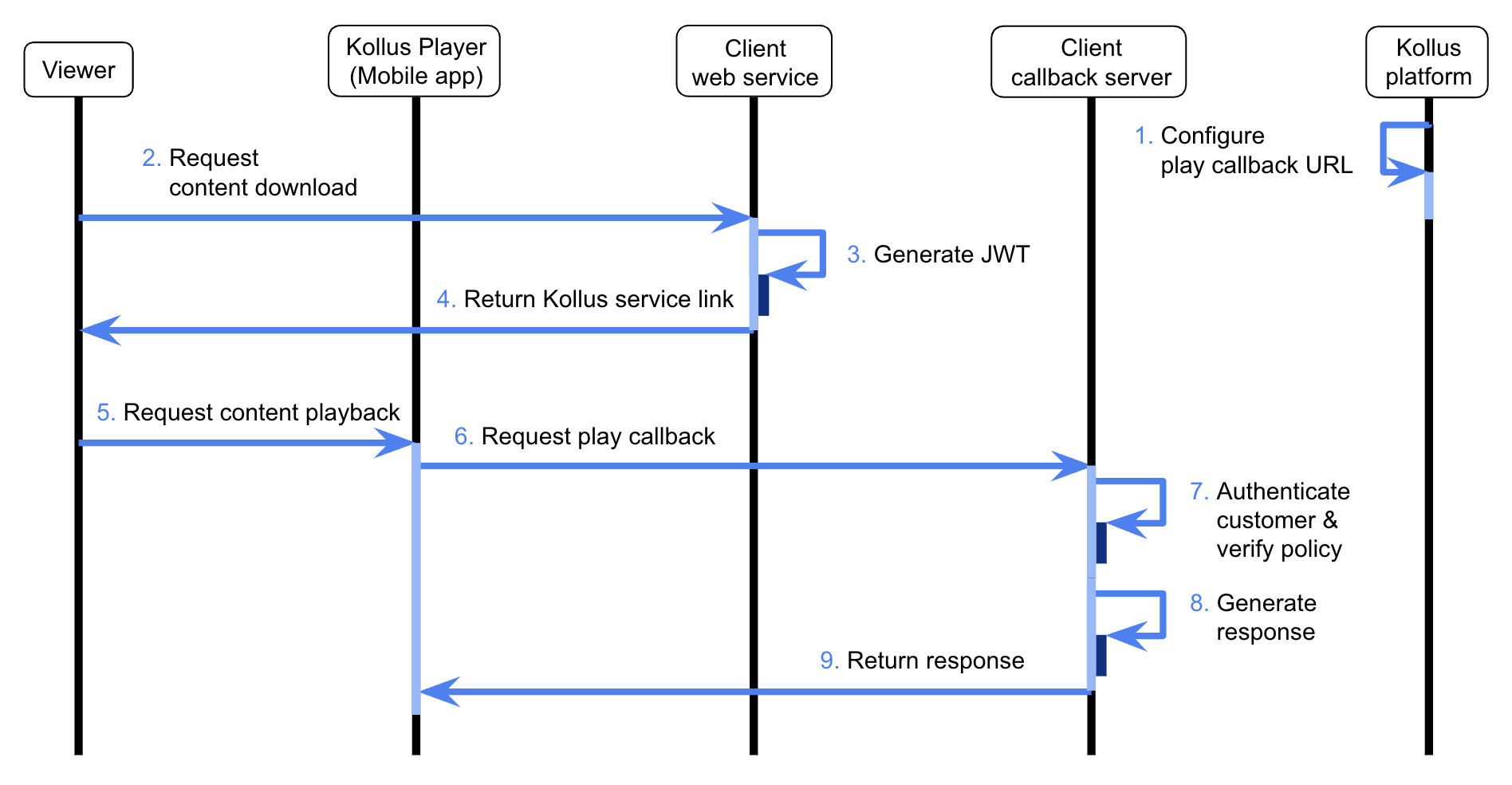
- Response specification: The response data from the callback server must be returned in JWT(JSON Web Token) format.
- Header authentication: The HTTP response header must include
X-KOLLUS-USERKEY: {CUSTOM_KEY}.- Where to find it: Kollus VOD console > [Settings] > [Custom key]
- Data types: All integer fields in JSON (
expiration_date,result,content_expired, etc.) must be passed asintegertype. (Sending as a string type such as"1"will cause processing failure.)
Callback types
Playback callbacks are divided into two types based on when they are invoked and their purpose.
kind 1(playback expiration setting): Dynamically assigns the viewer's playback expiration date before playback begins.kind 3(final playback approval): Performs a final check of the current playback permission immediately after the player is ready.
Request specifications
delivery method
- Method:
POST - Content-Type:
application/x-www-form-urlencoded - Data Format:
FormData
Request parameters
| Parameter | Type | Required | Description |
|---|---|---|---|
kind | integer | ◯ | Playback callback type
|
client_user_id | string | ◯ | User ID (the client_user_id entered when generating the JWT) |
player_id | string | ◯ | Kollus Player unique ID |
hardware_id | string | - | Hardware ID (provided when an identifiable value exists, such as in a Windows environment) |
device_name | string | - | Device model name |
media_content_key | string | ◯ | Media content key |
localtime | integer | - | Device time at the time of the request (Unix timestamp) |
uservalues | JSON string | - | Custom variables (uservalue0 to uservalue99) |
Uservalues example
{
  "uservalue0": "class_code_01",
  "uservalue1": "product_code_02",
  ...,
  "uservalue99": "custom_code_03"
}
Response specifications
kind 1 response fields
The kind 1 response is used to define the viewer's permissions and dynamically control security options (such as capture blocking and virtual machine environment detection).
Data fields
The expiration date and time (expiration_date) cannot be modified or revoked once recorded in the Kollus system. Be sure to assign an accurate Unix timestamp value.
| Field | Type | Required | Description |
|---|---|---|---|
expiration_date | integer | ◯ | Playback expiration date and time (Unix timestamp)
|
result | integer | ◯ | Approval result
|
message | string | - | Guidance message to display on the player screen when playback is blocked (result: 0)
|
vmcheck | integer | - | (HTML5 Player for PC only) Whether to allow playback in virtual machine (VM) environments
|
disable_tvout | integer | - | Whether to allow external display output (takes precedence over the channel's default policy)
|
expiration_playtime | integer | - | Playback time limit (sec)
|
cpcheck | integer | - | Whether to enable capture program detection (PC)
|
Exp fields
| Field | Type | Required | Description |
|---|---|---|---|
exp | integer | - | JWT expiration date and time (Unix timestamp) |
kind 1 response example
{
  "data" : {
    "expiration_date": 1402444800,
    "vmcheck": 1,
    "disable_tvout": 1,
    "expiration_playtime": 1800,
    "result": 1
  },
  "exp" : 1477558242
}
kind 3 response fields
The kind 3 response is used to perform a final check of the user's current permission status immediately before playback.
Data fields
| Field | Type | Required | Description |
|---|---|---|---|
content_expired | integer | - | Playback expiration status
|
result | integer | ◯ | Approval result (the result value takes precedence over the content_expired setting.)
|
message | string | - | Guidance message to display on the player when playback is blocked (result: 0 or content_expired: 1)
|
Exp fields
| Field | Type | Required | Description |
|---|---|---|---|
exp | integer | - | JWT expiration date and time (Unix timestamp) |
kind 3 response example
{
  "data" : {
    "content_expired": 1,
    "result": 1
  },
  "exp" : 1477558242
}