DRM Download Callback
This document is a machine-translated draft and is currently undergoing review. Some content may be inaccurate or differ from the original Korean version. For the most precise information, refer to the Korean documentation.
Kollus VOD supports the DRM download callback feature, which verifies security permissions when a user downloads content to a device or plays a stored file in an offline state. This allows you to control sophisticated DRM policies in real time, such as whether downloads are permitted, the number of allowed playbacks, and the expiration period.
Notes
- Data integrity: If the type of response data does not match or is out of range, downloads and playback will be immediately blocked.
- Settings cannot be revoked: Setting values such as incorrectly transmitted expiration date and time (
expiration_date) cannot be arbitrarily modified or canceled within the Kollus system, so accurate values must be transmitted. - Server availability: Service use may be restricted if there are callback server response delays or failures, so a stable server environment is recommended.
How to configure the callback
The callback URL can be configured in the Kollus VOD console.
- Guide: DRM download callback
Callback flow
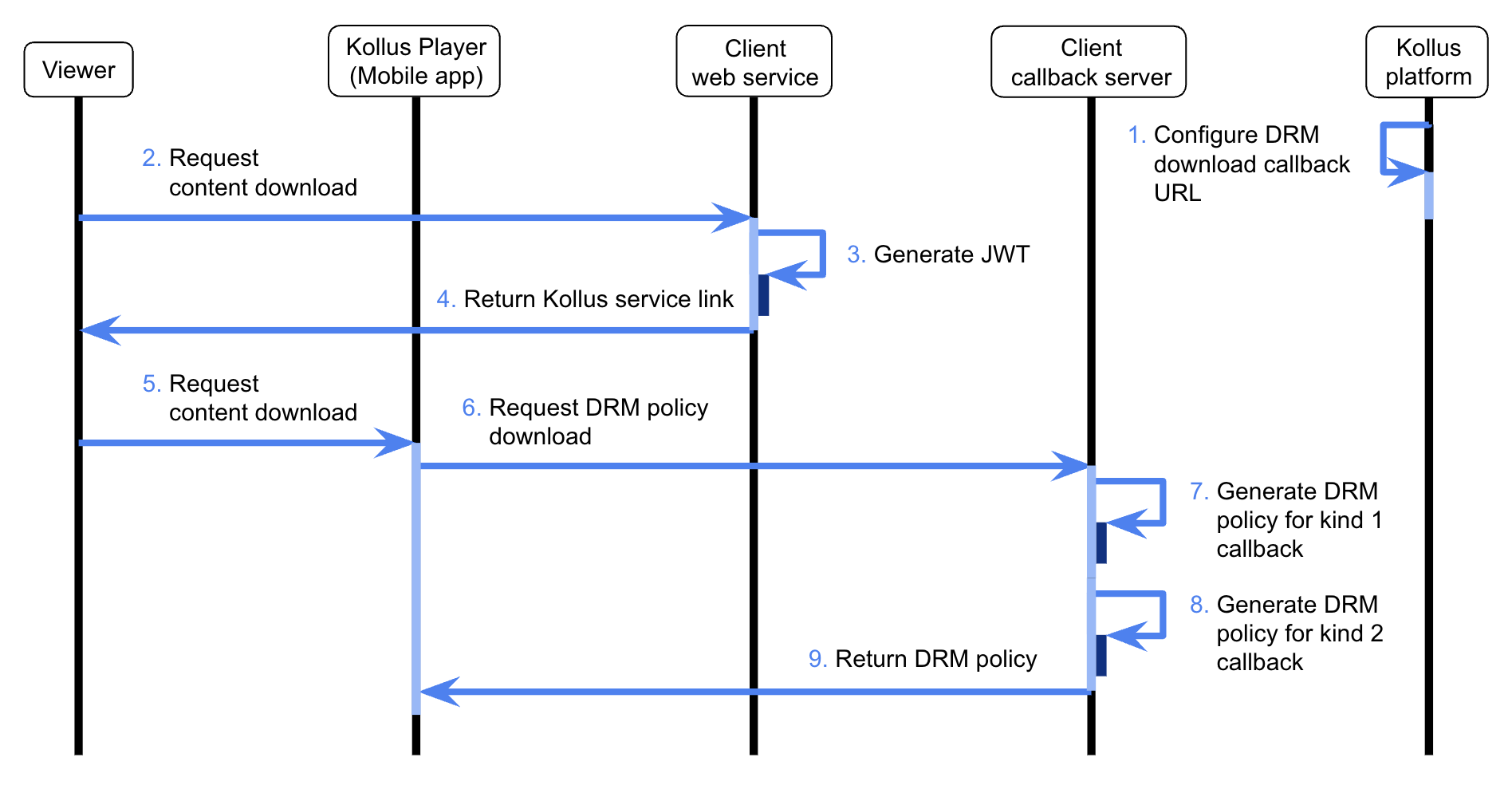
- Response specifications: The response data from the callback server must be returned in JWT (JSON Web Token) format.
- Header authentication:
X-KOLLUS-USERKEY: {CUSTOM_KEY}must be included in the HTTP response header.- Where to find: Kollus VOD console > [Settings] > [Custom key]
- Data types: All integer fields in JSON (
expiration_date,result,content_expired, etc.) must be passed asintegertype (sending as string type such as"1"will result in processing failure).
Callback types
DRM download callbacks are divided into three types according to their processing purpose.
kind 1(download approval): When a user clicks the download button, the server assigns permissions and DRM policies.kind 2(download completion notification): Sends result data when file saving to the device is 100% complete.kind 3(offline playback permission check): Checks playback permissions and expiration status every time stored content is played.
Request specifications
delivery method
- Method:
POST - Content-Type:
application/x-www-form-urlencoded - Data Format: Transmitted with a JSON string in
JSONArrayformat included in theitemsparameter
kind 1, kind 2 request parameters
Items
| Parameter | Type | Required | Description |
|---|---|---|---|
kind | integer | ◯ | DRM download callback type
|
client_user_id | string | ◯ | User ID (the client_user_id entered when generating the JWT) |
player_id | string | ◯ | Kollus Player unique ID |
hardware_id | string | - | Hardware ID (provided when an identifiable value exists, such as in a Windows environment) |
device_name | string | - | Device model name |
media_content_key | string | ◯ | Media content key |
localtime | integer | - | Device time at the time of the request (Unix timestamp) |
uservalues | JSON string | - | Custom variables (uservalue0 to uservalue99) |
kind 1, kind 2 items example
[
  {
    "kind": 1,
    "media_content_key" : "{MEDIA_CONTENT_KEY}",
    "client_user_id": "{END_USER_ID}",
    "player_id": "{PLAYER_ID}",
    "device_name": "{DEVICE_NAME}",
    "uservalues": {
      "uservalue0": "value0"
    }
  }
]
kind 3 request parameters
Items
| Parameter | Type | Required | Description |
|---|---|---|---|
kind | integer | ◯ | DRM download callback type
|
session_key | string | ◯ | Session key for expiration date renewal (used for consistency verification when requesting content_expire_reset) |
client_user_id | string | ◯ | User ID (the client_user_id entered when generating the JWT) |
player_id | string | ◯ | Kollus Player unique ID |
hardware_id | string | - | Hardware ID (provided when an identifiable value exists, such as in a Windows environment) |
device_name | string | - | Device model name |
media_content_key | string | ◯ | Media content key |
start_at | integer | ◯ | Local time at the time of the transfer request |
uservalues | JSON string | - | Custom variables (uservalue0 to uservalue99) |
content_expired | integer | - | Playback expiration status
|
check_expired | integer | - | Verification validity period expiration status
|
reset_req | integer | - | Batch update request status
|
expiration_date | integer | - | Playback expiration date and time (Unix timestamp) |
localtime | integer | - | Device time at the time of the request (Unix timestamp) |
kind 3 items example
[
  {
    "kind": 3,
    "session_key" : "{SESSION_KEY}",
    "media_content_key" : "{MEDIA_CONTENT_KEY}",
    "client_user_id": "{END_USER_ID}",
    "player_id": "{PLAYER_ID}",
    "device_name": "{DEVICE_NAME}",
    "uservalues": {
      "uservalue1": "value1"
    }
  }
]
Uservalues example
{
  "uservalue0": "class_code_01",
  "uservalue1": "product_code_02",
  ...,
  "uservalue99": "custom_code_03"
}
Response specifications
delivery method
DRM download callback responses must be encoded and returned in JWT (JSON Web Token) format for data security and integrity.
- Header:
X-KOLLUS-USERKEY: {CUSTOM_KEY} - Content-Type:
text/plain - Payload structure: Array structure containing individual content response objects within the
datafield{
"data": [
{ "kind": 1, "media_content_key": "...", "result": 1, ... },
{ "kind": 1, "media_content_key": "...", "result": 1, ... }
]
}
DRM expiration option specifications
Expiration options cannot be modified or revoked after being recorded in the Kollus system. Be sure to assign accurate Unix timestamp values.
| Option | Type | Allowed range | Description |
|---|---|---|---|
expiration_count | integer | 0 (no limit) – 1000 | Number of allowed playbacks |
expiration_date | integer | 0 (no limit) – 2145916799 (2037-12-31 23:59:59) | Playback expiration date and time (Unix timestamp) |
expiration_playtime | integer | 0 (no limit), 60 (60 seconds) – 604800 (7 days) | Playback time limit (sec) |
kind 1 response fields
The server determines whether to approve the user's download request and assigns the DRM policy for the content to be stored on the device.
Data items
| Field | Type | Required | Default | Description |
|---|---|---|---|---|
kind | integer | ◯ | - | DRM download callback type
|
media_content_key | string | ◯ | - | Media content key |
expiration_date | integer | - | - | Playback expiration date and time (Unix timestamp) |
expiration_count | integer | - | - | Number of allowed playbacks (e.g., 10 → 10 playbacks allowed) |
expiration_playtime | integer | - | - | Playback time limit (e.g., 60 → 60 seconds, 3600 → 1 hour of playback available) |
expiration_playtime_type | integer | - | - | Playback time deduction method
|
result | integer | ◯ | - | Approval result
|
message | string | - | - | Guidance message to display on the player screen when playback is blocked (result: 0) (Kollus default error message is displayed if not entered) |
expiration_refresh_popup | integer | - | 0 | Whether to show renewal notification upon expiration
|
vmcheck | integer | - | 1 | (HTML5 Player for PC only) Whether to allow playback in a virtual machine (VM) environment
|
check_abuse | integer | - | 0 | Whether to call kind 3 during offline playback
|
offline_bookmark.download | integer | - | 0 | Whether to simultaneously download bookmark data
|
offline_bookmark.readonly | integer | - | 0 | Bookmark editing permissions in offline state
|
kind 1 response example
{
  "data" : [
    {
      "kind": 1,
      "media_content_key": "{MEDIA_CONTENT_KEY}",
      "expiration_date": 1402444800,
      "expiration_playtime": 1800,
      "result": 1
    }
  ]
}
kind 2 response fields
Notifies the server that the content download process has completed successfully, and the server finalizes the validity of the content through the response.
Data items
| Field | Type | Required | Default | Description |
|---|---|---|---|---|
kind | integer | ◯ | - | DRM download callback type
|
media_content_key | string | ◯ | - | Media content key |
content_delete | integer | - | 0 | Whether to delete the file immediately after download completes
|
message | string | - | - | Guidance message to display on the player when playback is blocked (result: 0 or content_expired: 1) (Kollus default error message is displayed if not entered) |
check_expiration_date | integer | - | 0 | Verification validity period (Unix timestamp)
|
result | integer | ◯ | - | Processing result
|
kind 2 response example
{
  "data" : [
    {
      "kind": 2,
      "media_content_key": "{MEDIA_CONTENT_KEY}",
      "content_delete": 1,
      "result": 1
    }
  ]
}
kind 3 response fields
Data items
| Field | Type | Required | Default | Description |
|---|---|---|---|---|
kind | integer | ◯ | - | DRM download callback type
|
session_key | string | - | - | Session key for expiration date renewal (used for consistency verification when requesting content_expire_reset) |
media_content_key | string | ◯ | - | Media content key |
start_at | integer | ◯ | - | Returns the start_at value received in the request as-is |
content_expired | integer | - | 0 | Force content expiration processing
|
content_delete | integer | - | 0 | Whether to delete the file immediately after download completes
|
content_expire_reset | integer | - | 0 | Reset existing expiration policy
|
expiration_date | integer | - | - | Playback expiration date and time (Unix timestamp) |
expiration_count | integer | - | - | Number of allowed playbacks (e.g., 10 → 10 playbacks allowed) |
expiration_playtime | integer | - | - | Playback time limit (e.g., 60 → 60 seconds, 3600 → 1 hour of playback available) |
result | integer | ◯ | - | Processing result
|
message | string | - | - | Guidance message to display on the player when playback is blocked (result: 0 or content_delete: 1 or content_expired: 1) (Kollus default error message is displayed if not entered) |
check_abuse | integer | - | 0 | Whether to call kind 3 during offline playback
|
check_expiration_date | integer | - | 0 | Verification validity period (Unix timestamp)
|
- Resettable options (when
content_expire_reset: 1is set)expiration_date(playback expiration date and time)expiration_count(number of allowed playbacks)expiration_playtime(playback time limit)check_expiration_date(verification validity period)
- Reset ignored condition: If the
content_expiredvalue is1, the reset logic is ignored and playback is blocked even ifcontent_expire_resetis set to1.
kind 3 response example
{
  "data": [
    {
      "kind": 3,
      "session_key": "{SESSION_KEY}",
      "media_content_key": "{MEDIA_CONTENT_KEY}",
      "start_at": 140000000,
      "result": 1,
      "content_expired": 1,
      "content_delete": 1,
      "content_expire_reset": 1,
      "expiration_date": 1402444800,
      "expiration_count": 10,
      "expiration_playtime": 3600
    }
  ]
}
Device identification information (device_name) details
device_name is the information passed to identify the device when the player is called. It is transmitted in the following specifications depending on the operating system environment.
Android
In Android apps, a string combining the device's Build.DEVICE and Build.MODEL with a / (slash) is used.
- Specifications:
Build.DEVICE/Build.MODEL - Examples:
samsung/SM-G991N,google/Pixel_6
iOS
In iOS apps, the device_name provided by Apple is used as-is.
Full list of iOS device_name values
| Device | device_name |
|---|---|
| iPhone1,1 | iPhone |
| iPhone1,2 | iPhone 3G |
| iPhone2,1 | iPhone 3GS |
| iPhone3,1 | iPhone 4 (GSM) |
| iPhone3,3 | iPhone 4 CDMA |
| iPhone4,1 | iPhone 4S |
| iPhone5,1 | iPhone 5 A1428 |
| iPhone5,2 | iPhone 5 A1429 |
| iPhone5,3 | iPhone 5c A1456/A1532 |
| iPhone5,4 | iPhone 5c A1507/A1516/A1529 |
| iPhone6,1 | iPhone 5s A1433/A1453 |
| iPhone6,2 | iPhone 5s A1457/A1518/A1530 |
| iPhone7,1 | iPhone 6 Plus |
| iPhone7,2 | iPhone 6 |
| iPhone8,1 | iPhone 6s |
| iPhone8,2 | iPhone 6s Plus |
| iPhone8,4 | iPhone SE |
| iPhone9,1 | iPhone 7 A1660/A1779/A1780 |
| iPhone9,2 | iPhone 7 Plus A1661/A1785/A1786 |
| iPhone9,3 | iPhone 7 A1778 |
| iPhone9,4 | iPhone 7 Plus A1784 |
| iPhone10,1 | iPhone 8 A1863/A1906 |
| iPhone10,2 | iPhone 8 Plus A1864/A1898 |
| iPhone10,3 | iPhone X A1865/A1902 |
| iPhone10,4 | iPhone 8 A1905 |
| iPhone10,5 | iPhone 8 Plus A1897 |
| iPhone10,6 | iPhone X A1901 |
| iPhone11,2 | iPhone XS |
| iPhone11,4 | iPhone XS Max |
| iPhone11,6 | iPhone XS Max |
| iPhone11,8 | iPhone XR |
| iPhone12,1 | iPhone 11 |
| iPhone12,3 | iPhone 11 Pro |
| iPhone12,5 | iPhone 11 Pro Max |
| iPhone12,8 | iPhone SE (2nd gen) |
| iPhone13,1 | iPhone 12 mini |
| iPhone13,2 | iPhone 12 |
| iPhone13,3 | iPhone 12 Pro |
| iPhone13,4 | iPhone 12 Pro Max |
| iPhone14,2 | iPhone 13 Pro |
| iPhone14,3 | iPhone 13 Pro Max |
| iPhone14,4 | iPhone 13 mini |
| iPhone14,5 | iPhone 13 |
| iPhone14,6 | iPhone SE (3rd gen) |
| iPhone14,7 | iPhone 14 |
| iPhone14,8 | iPhone 14 Plus |
| iPhone15,2 | iPhone 14 Pro |
| iPhone15,3 | iPhone 14 Pro Max |
| iPhone15,4 | iPhone 15 |
| iPhone15,5 | iPhone 15 Plus |
| iPhone16,1 | iPhone 15 Pro |
| iPhone16,2 | iPhone 15 Pro Max |
| iPhone17,1 | iPhone 16 Pro |
| iPhone17,2 | iPhone 16 Pro Max |
| iPhone17,3 | iPhone 16 |
| iPhone17,4 | iPhone 16 Plus |
| iPhone17,5 | iPhone 16e |
| iPad1,1 | iPad |
| iPad2,1 | iPad 2 Wi-Fi |
| iPad2,2 | iPad 2 (GSM) |
| iPad2,3 | iPad 2 CDMA |
| iPad2,4 | iPad 2 Wi-Fi (revised) |
| iPad2,5 | iPad mini Wi-Fi |
| iPad2,6 | iPad mini A1454 |
| iPad2,7 | iPad mini A1455 |
| iPad3,1 | iPad 3rd gen (Wi-Fi) |
| iPad3,2 | iPad 3rd gen (Wi-Fi+LTE Verizon) |
| iPad3,3 | iPad 3rd gen (Wi-Fi+LTE AT&T) |
| iPad3,4 | iPad 4th gen (Wi-Fi) |
| iPad3,5 | iPad 4th gen A1459 |
| iPad3,6 | iPad 4th gen A1460 |
| iPad4,1 | iPad Air Wi-Fi |
| iPad4,2 | iPad Air Wi-Fi+LTE |
| iPad4,3 | iPad Air Rev |
| iPad4,4 | iPad mini 2 Wi-Fi |
| iPad4,5 | iPad mini 2 Wi-Fi+LTE |
| iPad4,6 | iPad mini 2 Rev |
| iPad4,7 | iPad mini 3 Wi-Fi |
| iPad4,8 | iPad mini 3 A1600 |
| iPad4,9 | iPad mini 3 A1601 |
| iPad5,1 | iPad mini 4 Wi-Fi |
| iPad5,2 | iPad mini 4 Wi-Fi+LTE |
| iPad5,3 | iPad Air 2 Wi-Fi |
| iPad5,4 | iPad Air 2 Wi-Fi+LTE |
| iPad6,3 | iPad Pro 9.7 inch Wi-Fi |
| iPad6,4 | iPad Pro 9.7 inch Wi-Fi+LTE |
| iPad6,7 | iPad Pro 12.9 inch Wi-Fi |
| iPad6,8 | iPad Pro 12.9 inch Wi-Fi+LTE |
| iPad6,11 | iPad 9.7 Inch 5th Gen Wi-Fi Only |
| iPad6,12 | iPad 9.7 Inch 5th Gen Wi-Fi/Cellular |
| iPad7,1 | iPad Pro 12.9 inch A1670 |
| iPad7,2 | iPad Pro 12.9 inch A18219 |
| iPad7,3 | iPad Pro 10.5 inch A1701 |
| iPad7,4 | iPad Pro 10.5 inch A1709 |
| iPad7,5 | iPad 6th gen A1893 |
| iPad7,6 | iPad 6th gen A1954 |
| iPad7,11 | iPad 7th gen (Wi-Fi) |
| iPad7,12 | iPad 7th gen (Wi-Fi+Cellular) |
| iPad8,1 | iPad Pro 11 inch 1st gen (Wi-Fi) |
| iPad8,2 | iPad Pro 11 inch 1st gen (Wi-Fi+LTE 256GB) |
| iPad8,3 | iPad Pro 11 inch 1st gen (Wi-Fi+LTE 512GB) |
| iPad8,4 | iPad Pro 11 inch 1st gen (Wi-Fi+LTE 1TB) |
| iPad8,5 | iPad Pro 12.9 inch 3rd gen (Wi-Fi) |
| iPad8,6 | iPad Pro 12.9 inch 3rd gen (Wi-Fi+LTE 256GB) |
| iPad8,7 | iPad Pro 12.9 inch 3rd gen (Wi-Fi+LTE 512GB) |
| iPad8,8 | iPad Pro 12.9 inch 3rd gen (Wi-Fi+LTE 1TB) |
| iPad8,9 | iPad Pro 11 inch 2nd gen (Wi-Fi) |
| iPad8,10 | iPad Pro 11 inch 2nd gen (Wi-Fi+LTE) |
| iPad8,11 | iPad Pro 12.9 inch 4th gen (Wi-Fi) |
| iPad8,12 | iPad Pro 12.9 inch 4th gen (Wi-Fi+LTE) |
| iPad11,1 | iPad mini 5th gen (Wi-Fi) |
| iPad11,2 | iPad mini 5th gen (Wi-Fi+LTE) |
| iPad11,3 | iPad Air 3rd gen (Wi-Fi) |
| iPad11,4 | iPad Air 3rd gen (Wi-Fi+LTE) |
| iPad11,6 | iPad 8th gen (Wi-Fi) |
| iPad11,7 | iPad 8th gen (Wi-Fi+LTE) |
| iPad12,1 | iPad 9th gen (Wi-Fi) |
| iPad12,2 | iPad 9th gen (Wi-Fi+LTE) |
| iPad13,1 | iPad Air 4th gen (Wi-Fi) |
| iPad13,2 | iPad Air 4th gen (Wi-Fi+LTE) |
| iPad13,4 | iPad Pro 11 inch 3rd gen (Wi-Fi) |
| iPad13,5 | iPad Pro 11 inch 3rd gen (Wi-Fi+LTE 512GB) |
| iPad13,6 | iPad Pro 11 inch 3rd gen (Wi-Fi+LTE 2TB) |
| iPad13,7 | iPad Pro 11 inch 3rd gen (Wi-Fi 2TB) |
| iPad13,8 | iPad Pro 12.9 inch 5th gen (Wi-Fi) |
| iPad13,9 | iPad Pro 12.9 inch 5th gen (Wi-Fi+LTE 512GB) |
| iPad13,10 | iPad Pro 12.9 inch 5th gen (Wi-Fi+LTE 2TB) |
| iPad13,11 | iPad Pro 12.9 inch 5th gen (Wi-Fi 2TB) |
| iPad13,16 | iPad Air 5th gen (Wi-Fi) |
| iPad13,17 | iPad Air 5th gen (Wi-Fi+LTE) |
| iPad13,18 | iPad 10th gen (Wi-Fi) |
| iPad13,19 | iPad 10th gen (Wi-Fi+LTE) |
| iPad14,1 | iPad mini 6th gen (Wi-Fi) |
| iPad14,2 | iPad mini 6th gen (Wi-Fi+LTE) |
| iPad14,3 | iPad Pro 11 inch 4th gen (Wi-Fi) |
| iPad14,4 | iPad Pro 11 inch 4th gen (Wi-Fi+LTE) |
| iPad14,5 | iPad Pro 12.9 inch 6th gen (Wi-Fi) |
| iPad14,6 | iPad Pro 12.9 inch 6th gen (Wi-Fi+LTE) |
| iPad14,8 | iPad Air 11 inch M2 (Wi-Fi) |
| iPad14,9 | iPad Air 11 inch M2 (Wi-Fi+LTE) |
| iPad14,10 | iPad Air 13 inch M2 (Wi-Fi) |
| iPad14,11 | iPad Air 13 inch M2 (Wi-Fi+LTE) |
| iPad16,1 | iPad mini 7th gen (Wi-Fi) |
| iPad16,2 | iPad mini 7th gen (Wi-Fi+LTE) |
| iPad16,3 | iPad Pro 11 inch M4 (Wi-Fi) |
| iPad16,4 | iPad Pro 11 inch M4 (Wi-Fi+LTE) |
| iPad16,5 | iPad Pro 13 inch M4 (Wi-Fi) |
| iPad16,6 | iPad Pro 13 inch M4 (Wi-Fi+LTE) |
| iPad16,7 | iPad 11th gen (Wi-Fi) |
| iPad16,8 | iPad 11th gen (Wi-Fi+LTE) |
| iPod1,1 | iPod touch |
| iPod2,1 | iPod touch 2nd gen |
| iPod3,1 | iPod touch 3rd gen |
| iPod4,1 | iPod touch 4th gen |
| iPod5,1 | iPod touch 5th gen |
| iPod7,1 | iPod touch 6th gen |
| iPod9,1 | iPod touch 7th gen |