Next Episode Callback
This document is a machine-translated draft and is currently undergoing review. Some content may be inaccurate or differ from the original Korean version. For the most precise information, refer to the Korean documentation.
Next episode callback is a feature that retrieves information about the next content to play in real time during content playback to implement continuous playback. The player requests the URL of the next video from the customer server before the current video ends to continue playback.
Notes
- Activation condition: When generating a JWT for playback, the
"next_episode": trueparameter must be included. For the last episode, set this value tofalseto disable the feature. (See also: Basic options) - Feature conflict warning: Cannot be used simultaneously with the
introandoutrofeatures. - Server availability: If the callback server response is delayed or the data format does not match, the feature will not work.
Callback configuration
The callback URL can be configured in the Kollus VOD console.
- Guide: Next episode callback
Callback flow
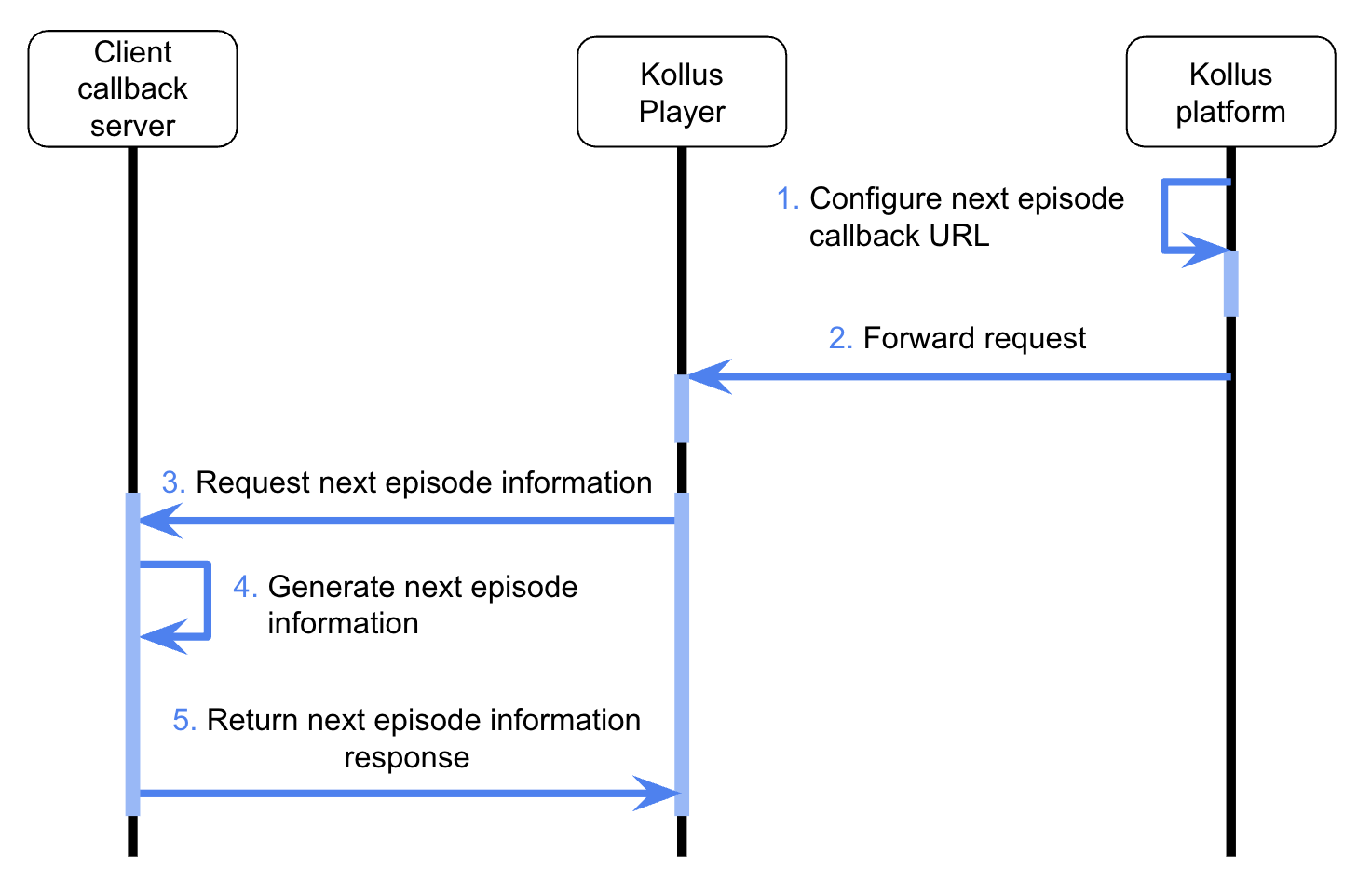
- Callback configuration: Set the callback URL per channel in the Kollus VOD console.
- Playback request: When a playback request is made, the customer server launches the player with a JWT containing
"next_episode": true. - Next episode information request: The player sends a
POSTrequest to the callback URL configured by the customer at the configured time. - Next video URL generation: The customer server identifies the current viewer and content, then generates a link for the next content to play.
- Continuous playback: The player plays the next video using the JSON data received from the customer server.
Callback configuration details
plugin options
These are the parameter items that will be sent together to the customer server when making a callback request.
| Parameter | Type | Description |
|---|---|---|
Media content key (mck) | string | Unique identifier for the content |
User (service member) ID (id) | string | Viewer ID (client_user_id entered when generating the JWT) |
Encoding profile key (epk) | string | Unique identifier for the encoding profile |
next episode callback data example
https://domain.com/callback?mck={MEDIA_CONTENT_KEY}&id={CLIENT_USER_ID}&epk={ENCODING_PROFILE_KEY}&uservalue0={USERVALUE0}
If the value contains Korean characters, special characters, or spaces, you must encode the value using UTF-8 URL encoding before passing it.
Request specifications
delivery method
- Method:
POST - Content-Type:
application/x-www-form-urlencoded - Data Format:
FormData
Response specifications
The customer server must return the next playback information in plain JSON format without encryption.
Response fields
| Field | Type | Description |
|---|---|---|
result | integer | Processing result
|
next_url | string | Playback URL for the next episode content |
Response example
{
  "result": 1,
  "next_url": "https://v.kr.kollus.com/si?jwt={JWT}&custom_key={CUSTOM_KEY}"
}
- Playback URL path:
next_urlmust be in the form of the secure playback path SI-link (/si). - Data format: Unlike other callbacks, the response must be returned as a plain JSON string rather than JWT-encoded.