Bookmark Integration
This document is a machine-translated draft and is currently undergoing review. Some content may be inaccurate or differ from the original Korean version. For the most precise information, refer to the Korean documentation.
Bookmark integration is a feature that synchronizes bookmark data created in the Kollus Player with an external server (customer database) via API.
Bookmark types
- My bookmarks (
"kind": 0): Personal data added directly by the user. - Official bookmarks (
"kind": 1): Table of contents, chapters, or key summary information configured by the customer. Displayed to all users in common.
- Feature activation: The bookmark integration feature is disabled by default. To activate this feature, please contact Technical Support (tech_support@kollus.com).
- Account-level settings: Only one bookmark integration URL can be registered per service account. (Individual settings per channel are not available.)
Requirements
- Offline synchronization: Bookmark data created by a user while offline must be transmitted to the server immediately upon going online.
Data transmission timing
| Platform | Data transmission timing |
|---|---|
| Mobile app | Cumulative data is transmitted when the app process terminates |
| PC (JavaScript) | Transmitted when the browser tab is closed or the page is navigated away (unload) |
API common parameters
Parameter specifications commonly included in bookmark-related API requests.
| Parameter | Type | Description |
|---|---|---|
upload_file_key | string | Unique identifier issued when content is uploaded |
media_content_key | string | Unique identifier for content within a channel |
client_user_id | string | User ID |
position | integer | Bookmark position (sec) |
localtime | integer | Time when the bookmark was added (Unix timestamp) |
label | string | Bookmark label |
value | string | Bookmark content |
uservalue0 to uservalue99 | string | Custom variable |
- Time synchronization:
localtimerepresents the local time on the user's device, not the server time. Discrepancies with the server may occur depending on the network environment, so it is not recommended to use this field for logic other than record-keeping. - UI mapping:
labelis the name of the bookmark group, andvalueis the text of an individual bookmark item.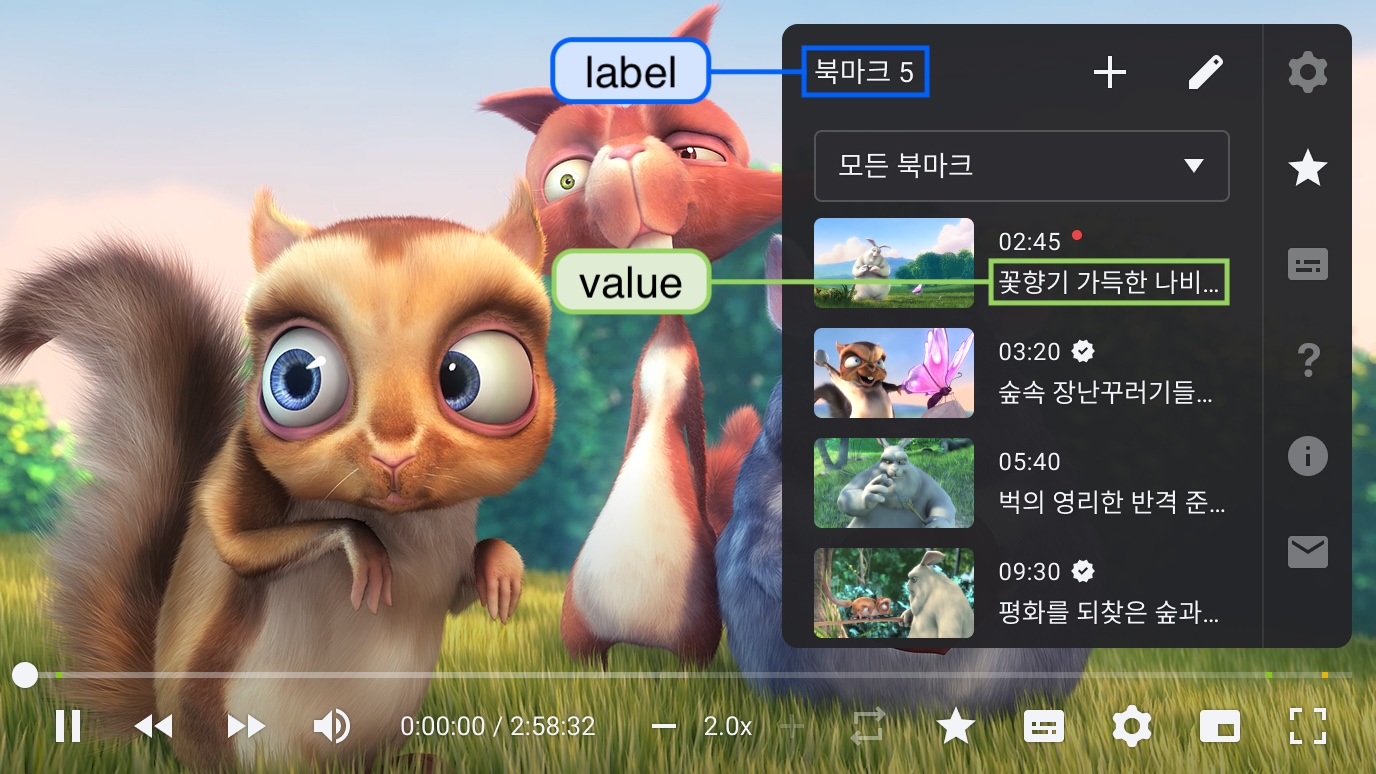
Bookmark list retrieval API (list URL)
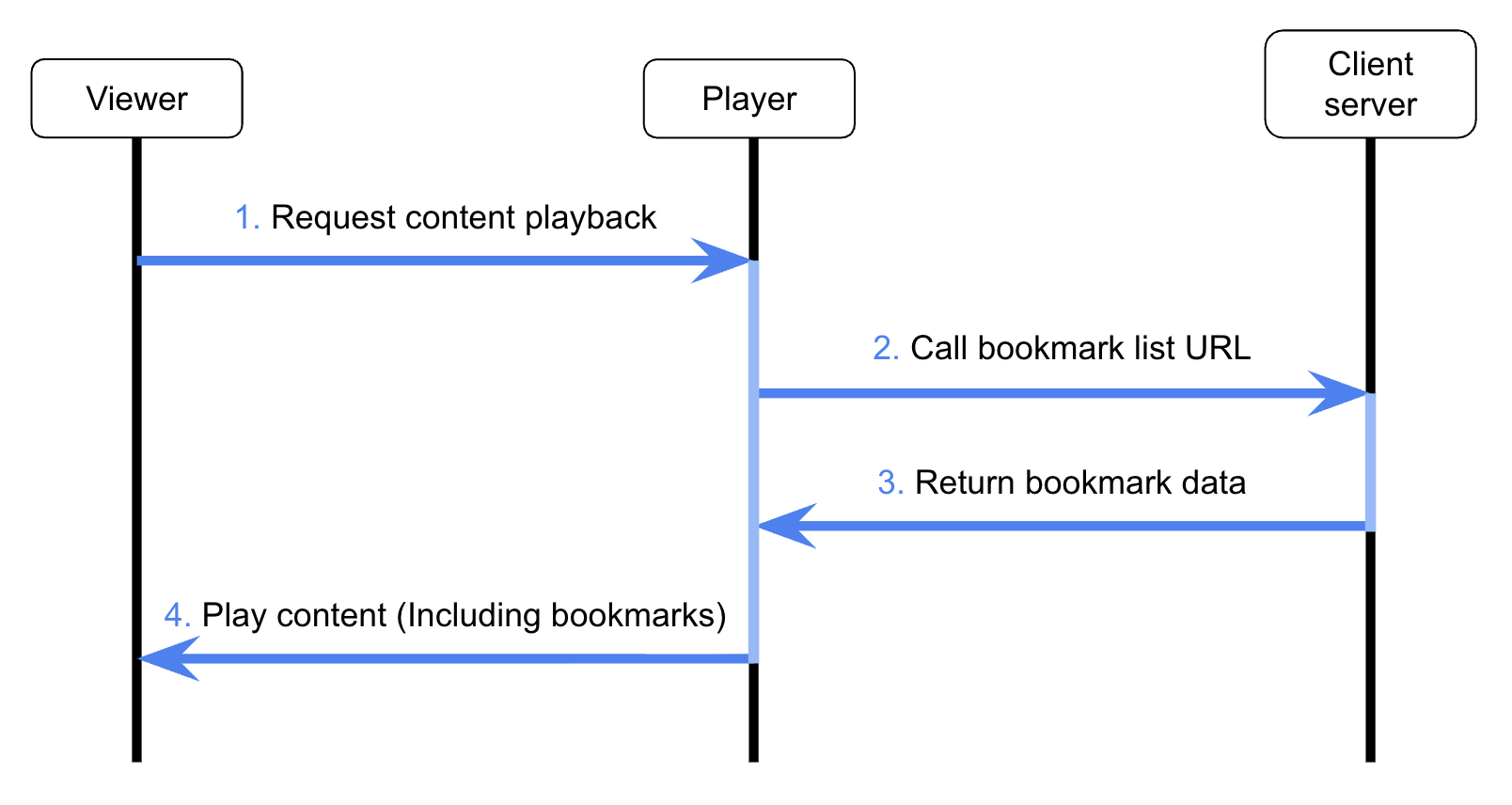
An interface that retrieves stored bookmark data when the player launches and returns it in JSON format. All responses must comply with UTF-8 encoding.
Request specifications
| Category | Official bookmarks | Official bookmarks + My bookmarks |
|---|---|---|
| Method | GET | GET |
| Parameters |
|
|
Dynamic parameter substitution
The {uservalue0} to {uservalue9} format within a registered List URL is automatically replaced with actual data at the time of the request.
- Registered URL
https://abc.com/bookmark/read?LC={uservalue0}&device={uservalue9}
- Actual call URL
https://abc.com/bookmark/read?LC=LC001&device=mobile
Response fields
| Field | Type | Description |
|---|---|---|
error | integer | API processing result (0: success, other: error) |
result | object | Object containing bookmark data |
result.bookmark_labels | array | Bookmark group names to be displayed in the bookmark list (e.g., ["My Bookmark", "Official Bookmark"]) |
result.bookmark_positions | array | Bookmark data |
Bookmark_positions items
| Field | Type | Description |
|---|---|---|
position | integer | Bookmark position (sec) |
value | string | Bookmark content |
kind | integer | Bookmark type
|
label | string | Official bookmark label (empty string if it is a personal bookmark) |
localtime | integer | Time when the bookmark was added (Unix timestamp) |
Response example
{
  "error": 0,
  "result": {
    "bookmark_labels": [ "My Bookmark", "Official Bookmark"],
    "bookmark_positions": [
      {
        "position": 3,
        "value": "Review items",
        "kind": 0,
        "label": "",
        "localtime": 1417568260
      },
      {
        "position": 5,
        "value": "Core formula summary",
        "kind": 1,
        "label": "Instructor Recommended",
        "localtime": 1417538265
      }
    ]
  }
}
Bookmark batch update API (update URL)
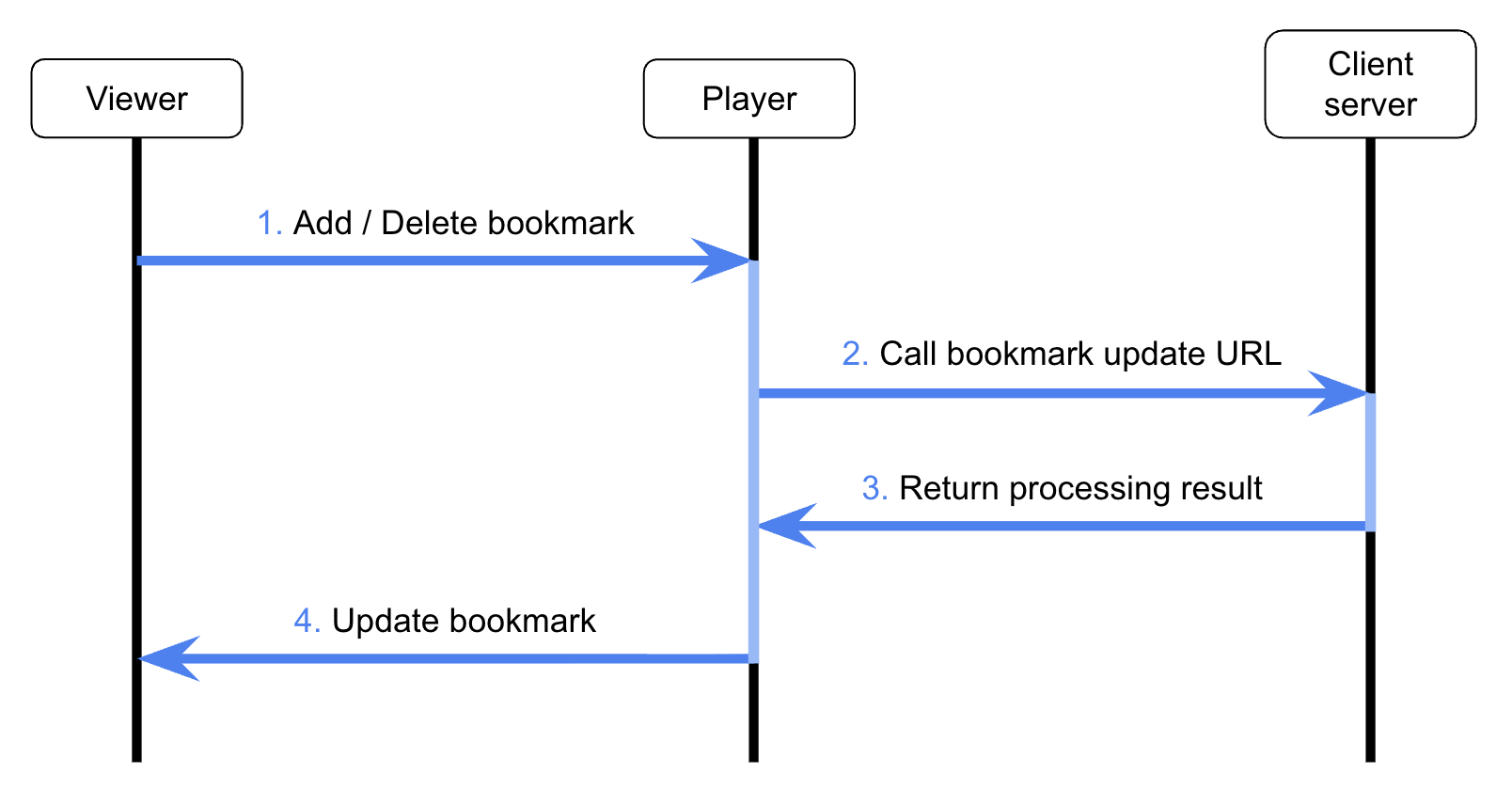
An API that combines bookmark add, update, and delete requests into a single request for processing.
The actions within the delivered Action Block array are executed in the order they are included in the array.
When the batch update (update) URL is activated, individual action URLs (register, remove) are not called and are managed through this API instead.
Request specifications
| Category | Details |
|---|---|
| Method | POST |
| Content-Type | application/x-www-form-urlencoded |
| Parameters | bookmarks (JSON string of the Action Block array) |
Action block structure
The required field configuration differs depending on the action type (register, remove) and bookmark type (official bookmark or Personal bookmark).
Action types
register: Add (register) a new bookmark or update an existing bookmarkremove: Delete a bookmark at a specific point (position)
Official bookmarks
| Field | Type | Description | register | remove |
|---|---|---|---|---|
action | string | Action type (register or remove) | ◯ | ◯ |
upload_file_key | string | Upload file key | ◯ | ◯ |
position | integer | Bookmark position | ◯ | ◯ |
label | string | Official bookmark label | ◯ | ◯ |
value | string | Bookmark content | ◯ | - |
localtime | integer | Time when the bookmark was added (Unix timestamp) | ◯ | ◯ |
My bookmarks
| Field | Type | Description | register | remove |
|---|---|---|---|---|
action | string | Action type (register or remove) | ◯ | ◯ |
media_content_key | string | Media content key | ◯ | ◯ |
client_user_id | string | User (viewer) ID of the customer service | ◯ | ◯ |
position | integer | Bookmark position | ◯ | ◯ |
value | string | Bookmark content | ◯ | - |
localtime | integer | Time when the bookmark was added (Unix timestamp) | ◯ | ◯ |
The bookmark content (value) field is not transmitted in a bookmark delete (remove) request.
Dynamic parameter substitution
The {uservalue0} to {uservalue9} format within a registered Update URL is automatically replaced with actual data at the time of the request.
- Registered URL
https://abc.com/bookmark/read?LC={uservalue0}&device={uservalue9}
- Actual call URL
https://abc.com/bookmark/read?LC=LC001&device=mobile
Response example
[
  {
    "action": "register",
    "media_content_key": "{MEDIA_CONTENT_KEY}",
    "client_user_id": "{END_USER_ID}",
    "position": 45,
    "value": "Key concept",
    "localtime": 1414538260,
    "LC": "LC001",
    "device": "mobile"
  },
  {
    "action": "remove",
    "media_content_key": "{MEDIA_CONTENT_KEY}",
    "client_user_id": "{END_USER_ID}",
    "position": 67,
    "localtime": 1417538260,
    "LC": "LC001",
    "device": "mobile"
  }
]
Integration flow
Bookmark list retrieval flow
Bookmark add/delete flow
Implementation guide
Customer server implementation checklist
Technical requirements that must be met by the customer's backend system for stable integration.
List API (list retrieval)
- Method: Implement logic to receive and process
GETrequests - Parameter identification: Data filtering based on
upload_file_keyormedia_content_key + client_user_id - Response format: Comply with JSON (UTF-8) format and construct the root object
- Status code: The
errorfield value in the response object must be returned as0upon successful processing
Update API (batch update)
- Method: Implement logic to receive and process
POSTrequests - Data parsing: Parse the JSON string passed via the
bookmarksparameter - Sequential processing: Execute
registerandremoveactions within theAction Blockarray in index order - Data substitution: Handle replacement of
uservalue0touservalue99dynamic parameters included in the URL with actual data
Error handling
| Situation | Recommended handling |
|---|---|
| Delete request for a non-existent bookmark | Ignore the request but return a success response (error: 0) |
| Duplicate bookmark add request | Update the existing value, or ignore the request and return success (error: 0) |
| Invalid parameter passed | Return a non-zero error code in the error field of the response object |