Live Analytics
Notice
This document is a machine-translated draft and is currently undergoing review. Some content may be inaccurate or differ from the original Korean version. For the most precise information, refer to the Korean documentation.
Note
- Reference time zone: All data is based on UTC (GMT +0:00).
- Update timing: All data is available approximately 30 minutes after the live stream ends.
- Data export: Click [Statistics download] in the upper right corner to export data in
.xlsxformat.
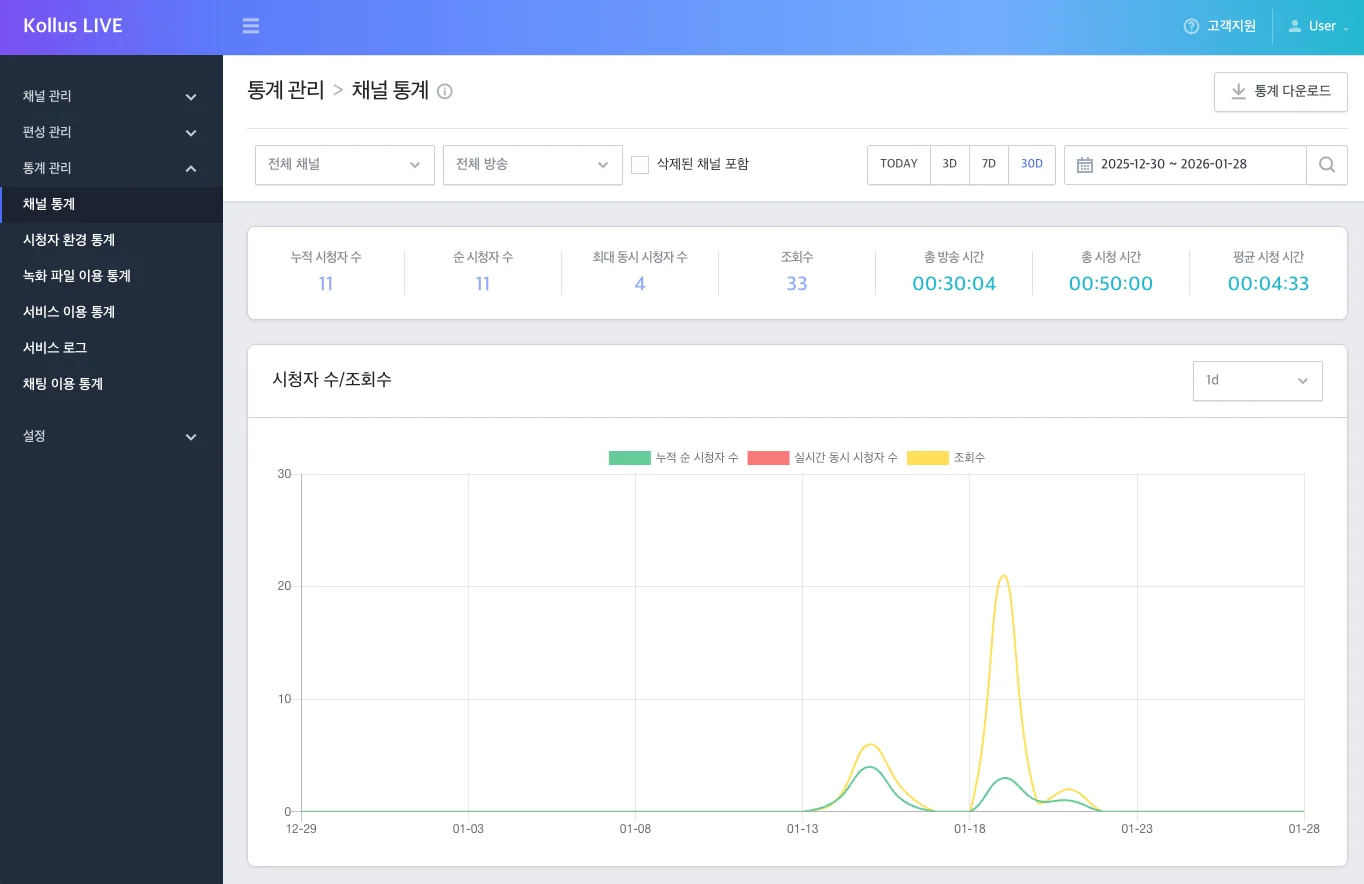
Channel statistics
Check key performance indicators by channel or broadcast unit.
- Navigation path: Kollus Live console > [Analytics] > [Channel statistics]
| Item | Description |
|---|---|
| Cumulative viewers | Total number of connections including duplicate access. Counted if playback occurs even for 1 second. |
| Unique viewers | Number of unique connections with duplicates removed. (Identified by viewer IP + User-Agent combination) |
| Maximum concurrent viewers | Number of connections at the peak viewership point during the broadcast. (Aggregated in 5-minute intervals, including duplicate connections) |
| Views | Number of times the player was loaded (number of View URL calls). Independent of whether actual playback occurred. |
| Total stream time | Time from encoder streaming start to end. (Billed in 1-hour increments; less than 1 hour is treated as 1 hour) |
| Total watch time | Cumulative sum of playback time for all viewers including duplicate connections. (Billed in 1-hour increments; less than 1 hour is treated as 1 hour) |
| Average watch time | Average time spent per person, calculated as 'total watch time ÷ cumulative viewers'. |
| Traffic/Data transfer | Total network data transfer volume generated during broadcast streaming and viewing. |
| Response code | Statistics on network and communication error occurrences. |
| Profile | When ABR(Adaptive Bitrate) is applied, shows the proportion of video quality (480p, 720p, etc.) most commonly selected by viewers.
|
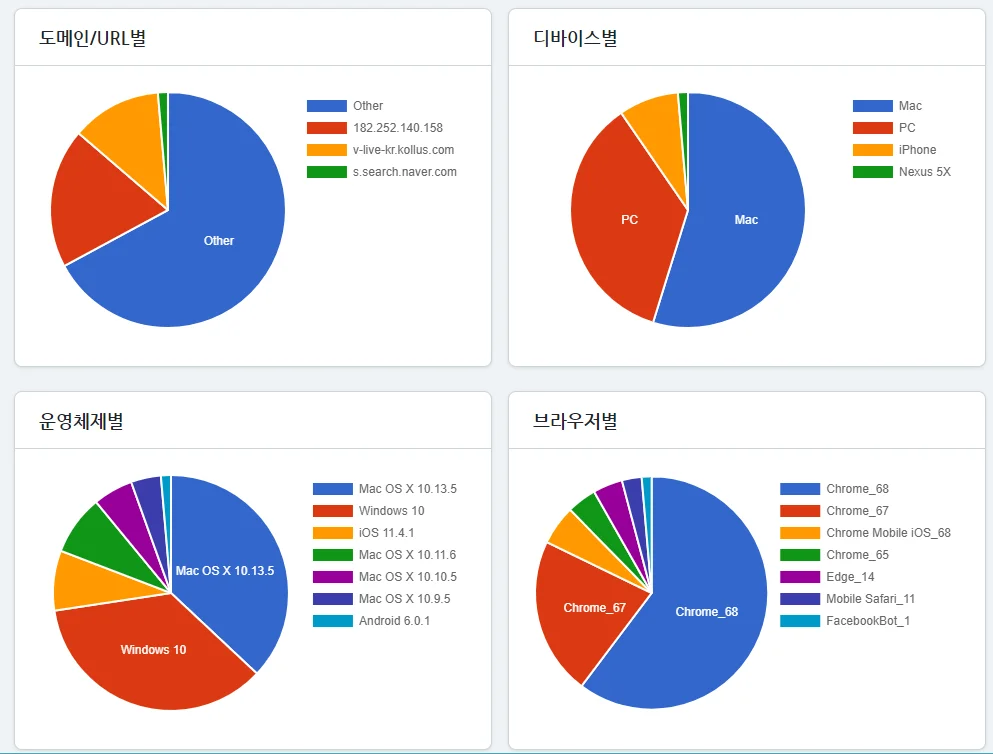
Viewer environment statistics
Check the path and device through which viewers watched the broadcast.
- Navigation path: Kollus Live console > [Analytics] > [Viewer environment statistics]
Record usage statistics
Check the recording file size by channel unit.
- Navigation path: Kollus Live console > [Analytics] > [Recording usage statistics]
| Item | Description |
|---|---|
| Number of live streams | Total number of live streams conducted within the set period. |
| Watch time | Cumulative sum of playback time for all viewers including duplicate connections. (Billed in 1-hour increments; less than 1 hour is treated as 1 hour) |
| Stream time | Time from encoder streaming start to end. (Billed in 1-hour increments; less than 1 hour is treated as 1 hour) |
| File size (GiB) | Total size of generated recording files. |
Service usage statistics
Check resource usage and additional feature utilization by channel unit.
- Navigation path: Kollus Live console > [Analytics] > [Service usage statistics]
| Item | Description |
|---|---|
| Number of live streams | Total number of live streams conducted within the set period. |
| Watch time | Cumulative sum of playback time for all viewers including duplicate connections. (Billed in 1-hour increments; less than 1 hour is treated as 1 hour) |
| Stream time | Time from encoder streaming start to end. (Billed in 1-hour increments; less than 1 hour is treated as 1 hour) |
| Syndication time | Cumulative sum of simultaneous streaming time to external platforms. |
| File size (GiB) | Total size of generated recording files. |
| Cumulative viewers | Total number of connections including duplicate access. Counted if playback occurs even for 1 second. |
| Unique viewers | Number of unique connections with duplicates removed. (Identified by viewer IP + User-Agent combination) |
| Maximum concurrent viewers | Number of connections at the peak viewership point during the broadcast. (Aggregated in 5-minute intervals, including duplicate connections) |
| Views | Number of times the player was loaded (number of View URL calls). Independent of whether actual playback occurred. |
Service log
All operation histories within the system are recorded for operational transparency and security management.
- Navigation path: Kollus Live console > [Analytics] > [Service log]
- Key recorded items
- Account activity (sign-in)
- Channel management (creation, modification, hiding, restoration, deletion)
- Broadcast control (live start/end, manual recording control)
- Data export (statistics and log file download history)
Chat usage statistics
Quantify user activity and communication volume to gauge broadcast engagement.
- Navigation path: Kollus Live console > [Analytics] > [Chat usage statistics]
| Item | Description |
|---|---|
| Number of live streams | Total number of live streams conducted within the set period. |
| Chat participants | Number of unique participants who entered the chat window at least once during the broadcast. |
| Chat messages | Cumulative total of all messages sent during the broadcast. |
| Average chat connections | Average number of users simultaneously connected to the chat window during the broadcast. |
| Average chat messages | Average messages sent per person, calculated as 'total messages ÷ chat participants'. |