Live Security Settings
This document is a machine-translated draft and is currently undergoing review. Some content may be inaccurate or differ from the original Korean version. For the most precise information, refer to the Korean documentation.
Applying appropriate security policies based on the nature of a live event is essential for protecting content value and optimizing delivery costs. While reach is important for publicly broadcast marketing events, paid seminars and internal training sessions require a robust security environment where only authorized users can view the content.
Kollus Live applies the same VOD security expertise to live streaming, providing step-by-step security solutions ranging from unauthorized link sharing to blocking professional recording programs.
Content distribution scope settings
This is the most fundamental security step for determining the distribution scope of content.
- Configuration path: Kollus Live console > [Channel] > [Channel list] > [Edit] on the right side of the target channel > [Visibility]
- Configuration options
Configuration option Description Public Anyone can watch via the View URL(Video Gateway Link). Private Even if the URL is exposed externally, unauthorized users cannot view the content. Access is only allowed through a one-time JWT(JSON Web Token)-based URL.
Concurrent viewers limit
Set the maximum number of viewers that can be connected simultaneously per channel to manage system resources and prevent unauthorized viewing.
- Configuration path: Kollus Live console > [Channel] > [Channel list] > [Edit] on the right side of the target channel > [Concurrent viewers limit]
- How it works
- Individual connections are identified by combining the viewer's IP address and User-Agent (device and browser identification information).
- If there is no server response for 60 seconds after the last request, the connection is determined to have ended and is excluded from the count.
�phrase0�-exclusive features
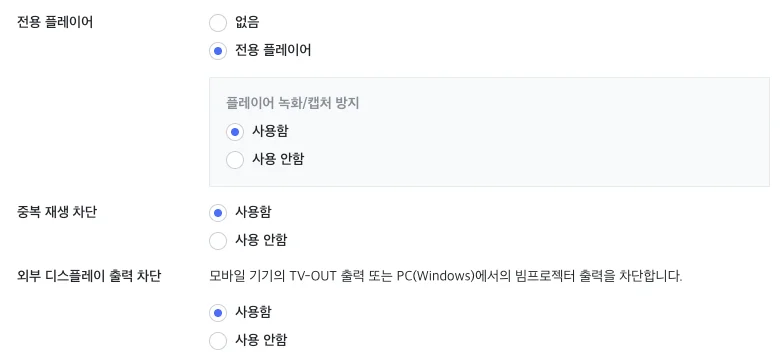
If broadcast content is security-sensitive, integration with the Agent-based Kollus secure player is essential.
The following features provide a very strong level of security, but installation guidance may be required depending on the viewer's operating system or browser specifications. Consulting with a Account Manager(biz@catenoid.net) is strongly recommended before adoption.
Recording/capture prevention
Detects and blocks screen recording and capture programs running on PC or mobile. When a capture attempt is made, the screen turns black or playback is interrupted.
- Configuration path: Kollus Live console > [Channel] > [Channel list] > [Edit] on the right side of the target channel > Set [Kollus secure player] to [Kollus secure player] > Enable [Recording/capture prevention]
Concurrent playback prevention
Determines the viewer's connection information (player_id + session_id) and blocks duplicate connections from the same viewer in real time.
- Prerequisite: The channel must be set to Private.
- Configuration path: Kollus Live console > [Channel] > [Channel list] > [Edit] on the right side of the target channel > Enable [Concurrent Playback Prevention]
Block external display output
Blocks output to TVs, projectors, external monitors, and similar devices.
- Configuration path: Kollus Live console > [Channel] > [Channel list] > [Edit] on the right side of the target channel > Enable [Block external display output]
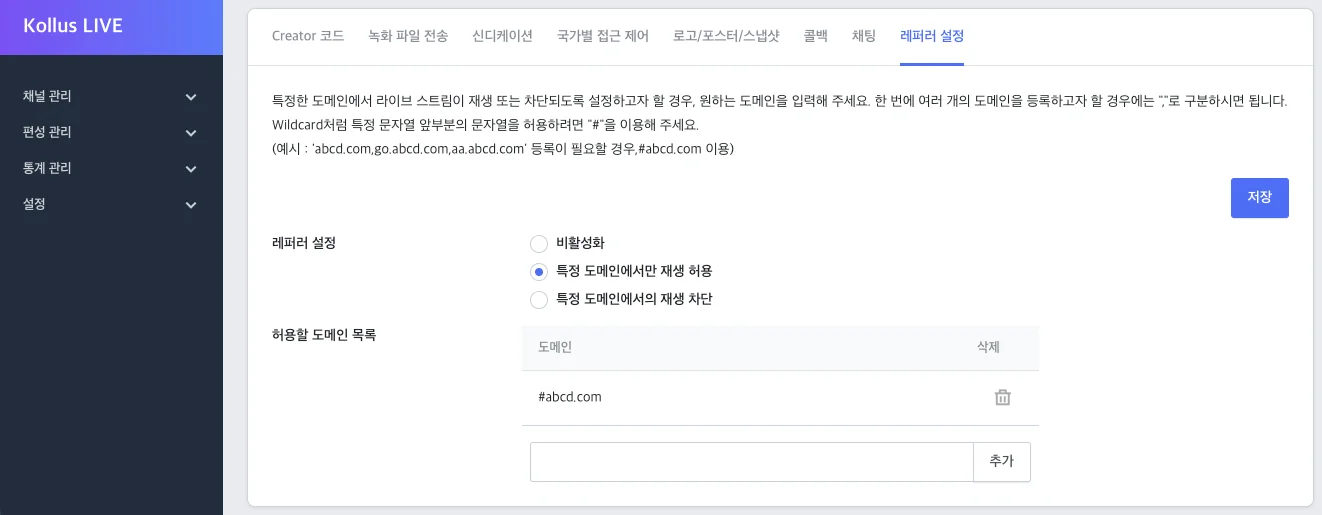
Referrer settings
Checks the address (Referer) of the web page from which the content request originated, and prevents unauthorized access to the player from non-permitted sites.
- Configuration path: Kollus Live console > [Channel] > [Channel list] > [Edit] on the right side of the target channel > [Referrer settings] tab at the bottom
- Policy options
Policy option Description Disabled Allows playback from all domains. Allow playback only from specific domains Allows access only from the domains entered (whitelist). Block playback only from specific domains Blocks access only from the domains entered (blacklist).