Real-time Subtitles
Real-time subtitles is a feature that converts speech into text in real time (STT) and translates it during a live stream, providing overlay captions on the player screen. After the broadcast ends, you can download language-specific caption files (SRT) for use in VOD services and asset management.
Key features
- Real-time STT and translation: Automatically recognizes speech such as Korean and English to generate original-language captions, and simultaneously provides real-time translated captions based on them. (Even when Korean and English speech alternates, the spoken language is automatically detected and displayed as original-language captions.)
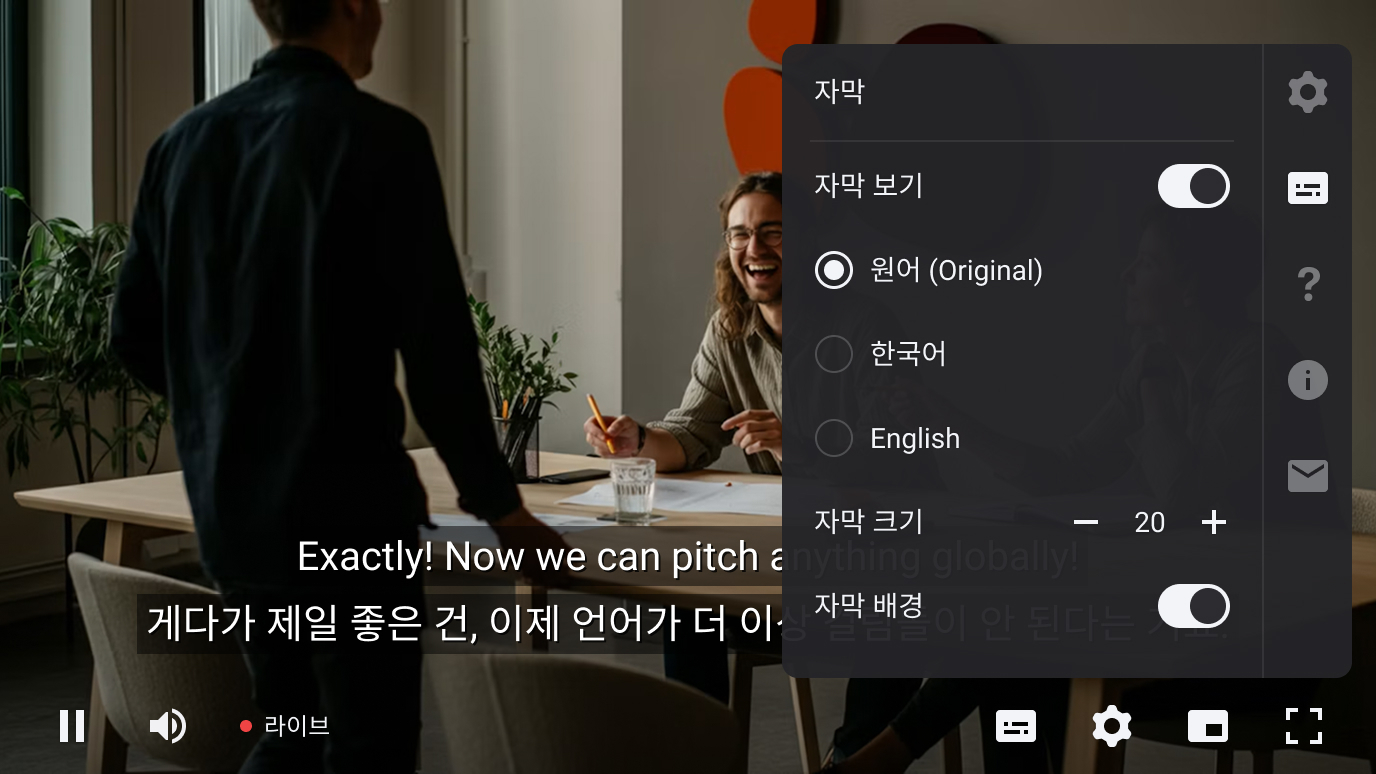
- Player overlay UI: Displayed as an overlay above the bottom control bar of the player, with the height automatically adjusting up to a maximum of 3 lines depending on the text length.
- VOD caption download: After the broadcast ends, you can download all generated language-specific SRT captions in bulk.

Prerequisites
Before applying the real-time subtitles feature, check the following prerequisites and constraints.
Prerequisites
- Supported player: Kollus Web Player
- Supported channel types: Live or Low Latency Live channel (not available for Scheduled Live)
Compatibility and feature constraints
Real-time subtitles can be used individually together with most major features except timeshift. However, when two or more features are combined with Real-time subtitles, usage may be restricted due to compatibility issues between certain features.
| Feature combination | Can be used simultaneously | Notes |
|---|---|---|
| Real-time subtitles + Security (AES-128 / Multi-DRM) | Yes | - |
| Real-time subtitles + Live stream forwarding | Yes | When the streaming path switches, the viewer's caption settings (on/off, selected language) are automatically maintained |
| Real-time subtitles + Low Latency Live (LL-HLS) | Yes | In ultra-low latency segments of under 6–7 seconds, captions may appear slightly delayed due to STT and translation processing time |
| Real-time subtitles + Timeshift | No | - |
| Real-time subtitles + Live stream forwarding + Security (AES-128 / Multi-DRM) | No | Live stream forwarding and security features are not compatible with each other |
| Real-time subtitles + Low Latency Live (LL-HLS) + Security (AES-128 / Multi-DRM) | No | Low Latency Live and security features are not compatible with each other |
How to configure real-time subtitles
You can configure the real-time subtitles feature on a per-channel basis in the Kollus Live console.
The real-time subtitles feature is supported only on Live and Low-Latency Live channels (not supported for Scheduled Live channels). Since existing channel types cannot be changed, please refer to the Create a new channel documentation to create a new channel with the Live or Low-Latency Live type.
- In the Kollus Live console, go to [Channel] > [Channel list], and click [Edit] to the right of the target channel.
- Set [Real-time subtitles] to [On].
- (Optional) In the [Translated caption language] field, select the translation language(s) to provide to viewers.
- After completing the configuration, click [Save].
Viewer player behavior
- Initial display state: To optimize screen immersion and network resources, the default caption display state is set to OFF when a viewer first enters the stream.
- Language selection and switching: Viewers can manually turn captions ON directly from the player UI, and the default is original-language captions.
Downloading captions (SRT) after the broadcast ends
- Download location: Kollus Live console > [Channel] > [Channel list] > click the target channel name > [Broadcast list] at the bottom > [Download subtitles] column
- Format provided: All SRT files generated for each language during the broadcast are provided as a single
.ziparchive file. (Download via the Live API is also supported.) - Usage check: On the Kollus Live console > [Statistics management] > [Service usage] page, you can check the total generation time for original-language and translated captions.
Notes
- Caption download traffic billing: The data transfer volume generated when downloading caption files is billed as part of traffic usage, in the same way as snapshot data.
- Recording timecode sync: Since the provided SRT caption files are created based on the timecode of the actual live broadcast, they may not be in sync with the recorded video.
- Caption file generation error handling: Even if an error occurs in a language track during caption generation, the file is not excluded from the compressed file list; instead, it is left as a 0-byte file or provided as a dummy caption cue containing a notice message.