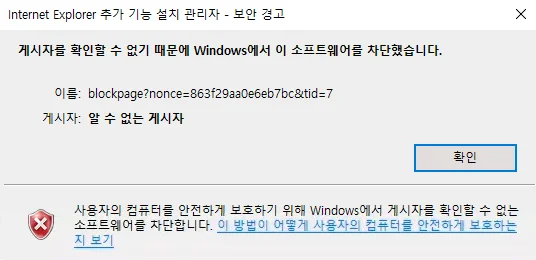
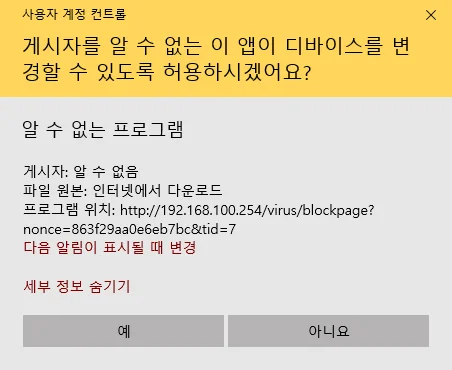
Windows has blocked this software
This document is a machine-translated draft and is currently undergoing review. Some content may be inaccurate or differ from the original Korean version. For the most precise information, refer to the Korean documentation.
- Error message: "Windows has blocked this software."
- Summary: Player launch failure due to Windows built-in security, antivirus programs, or corporate network firewall policies
Symptoms
When video playback starts, a software blocking message appears in a Windows security dialog, or the player fails to launch properly and freezes.
Causes
- Windows SmartScreen and built-in security: The Windows operating system mistakenly identifies the player installation file or agent as unsafe and blocks it.
- Conflict with antivirus programs: An antivirus program installed on the PC incorrectly detects the Kollus Player process as a threat and restricts its execution.
- Network firewall policies: In shared network environments such as companies, schools, or public institutions, security policies (IP/port blocking) block the player's required server communications.
Solutions
Reinstall the player
If the automatic installation process is blocked by Windows security, try downloading the official installation file and proceeding with the installation.
- Close all open browsers.
- Completely uninstall the existing Kollus Player app.
- Download the official installation file.
- Right-click the downloaded installation file, select [Run as administrator], and proceed with the installation.
Disable antivirus real-time protection
Refer to the document below to disable the real-time protection feature of the antivirus program installed on your PC, then try installing and running the player.
- See Also: Conflict with antivirus programs
Contact your network administrator
If the issue only occurs in a specific location (company, government office, etc.), the player's communication IP may be blocked by the network security policy at that location. Ask the network security administrator to add the Kollus Player's communication IP/port to the whitelist.