Kollus Player Overview
This document is a machine-translated draft and is currently undergoing review. Some content may be inaccurate or differ from the original Korean version. For the most precise information, refer to the Korean documentation.
Kollus Player overview
Kollus Player is an integrated playback solution combining a high-performance streaming engine with powerful content security technology (DRM).
- Content Asset Protection: Prevents unauthorized copying and leakage through advanced security features
- Optimized Viewing Experience: Provides stable playback performance regardless of the viewing environment
- Global CDN: Guarantees high-quality streaming equivalent to domestic performance overseas by leveraging cache servers at worldwide nodes
Intelligent streaming
Content can be played instantly in a web browser without any installation, and the following global delivery technologies are employed to ensure seamless viewing from anywhere in the world.
- Adaptive Bitrate(ABR): Automatically adjusts video quality in real time based on network bandwidth differences to prevent buffering.
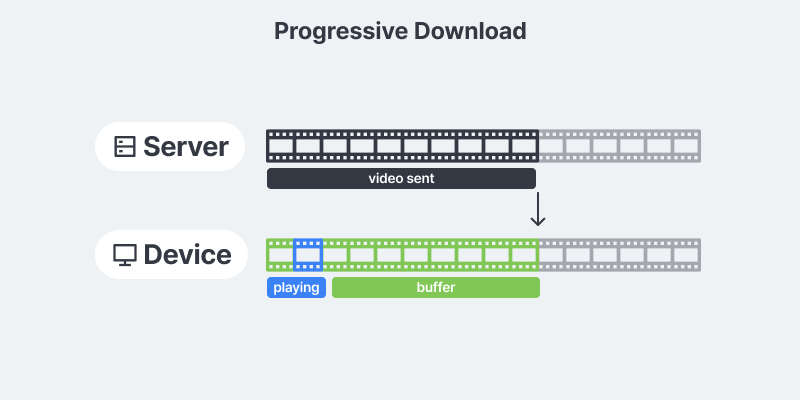
- Progressive Download: Receives video in segments to dramatically reduce initial loading time even in overseas access environments.
- No Installation Required: Can be launched immediately in a standard web browser without installing any plugins. (However, some features of the Kollus secure player may require Agent installation.)
Download and offline playback
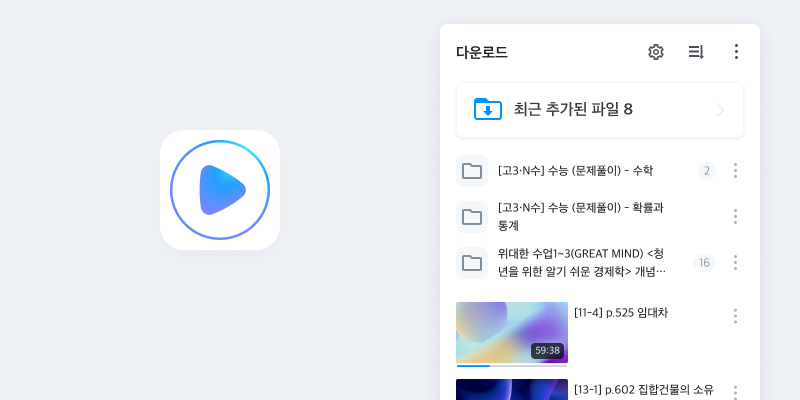
The download feature allows users to save content to their own devices and watch videos without interruption, even in environments with unstable network connections or limited data usage.
- Download Feature for Users: Separate from the original file download in the Kollus VOD console, this feature allows users to save content to their own devices for offline playback.
- Strong Content Protection: Video data stored on the device remains encrypted, preventing unauthorized external leakage and copying.
- Playback Permission Control: Even in offline mode, playback validity periods are checked and user permissions are verified to enable thorough content license management.
- Development Required: To implement this feature, you must integrate the secure player call and callback logic appropriate for your service environment.
- Guide: DRM download callback
- File download: A feature for customer administrators to download original files from the Kollus VOD console
- Guide: File download
- Content download: A feature that allows users to save encrypted files to their devices for offline viewing
Kollus Player types
Kollus VOD provides a variety of players optimized for different content security levels (standard, Kollus DRM, Multi DRM). You can select and operate the appropriate player based on the nature of your content.
- Standard content (unencrypted): Can be played without restriction on all types of Kollus Players.
- Encrypted content (DRM applied): Content with copyright protection technology applied; playback and control is only possible on specific players permitted under the security specifications.
What is a secure player?
This refers to the family of player products that fully support playback and download of content with Kollus DRM applied. It is recommended when operating paid courses or corporate internal content where strong security is essential, and provides an optimal environment to prevent unauthorized copying and external leakage by unauthorized users.
Player feature comparison
| Player | Supported OS | Kollus DRM Playback/Download secure player | Multi DRM Playback | Concurrent Playback/Recording/Capture Prevention | External Output Prevention | Live Streaming |
|---|---|---|---|---|---|---|
| Web PlayerNEW Plugin-less integrated player |
| ◯ | ◯ | ◯ | ◯ | ◯ |
| HTML5 Player for PC PC-only secure player |
| ◯ | ✕ | ◯ | △ (Windows Only) | ✕ |
| HTML5 Player for All General-purpose non-secure player |
| ✕ | ◯ | ✕ | ✕ | ◯ |
| App Player for Android App-based secure player | Android | ◯ | ◯ | ◯ | ◯ | ◯ |
| App Player for iOS App-based secure player | iOS | ◯ | ◯ | ◯ | ◯ | ◯ |
| App Player for Windows App-based secure player | Windows | ◯ | ✕ | ◯ | ◯ | ◯ |
| App Player for macOS App-based secure player | macOS | ◯ | ✕ | ◯ | ◯ | ◯ |
If you want to integrate Kollus Player functionality into your existing app, a separate consultation is required regarding the use of the Kollus Mobile App SDK. Contact your Account Manager(biz@catenoid.net) or Technical Support(tech_support@catenoid.net).
- Learn More: Kollus Mobile App SDK
Kollus Web Player
Kollus Web Player is a next-generation player that runs instantly in a browser without any separate installation. It complies with HTML5 standards to provide integrated support for both encrypted (DRM) and standard content (unencrypted), and can be operated in parallel with existing players for flexible service migration.
Existing player vs Kollus Web Player performance comparison
| Item | Existing Player | Web Player |
|---|---|---|
| Loading Speed (Standard Content) | Approx. 2 seconds | Less than approx. 1 second |
| Initial Loading Optimization | ✕ | ◯ |
| Low-Latency Streaming (LL-HLS) | △ | ◯ |
| Streaming Stability | ✕ | ◯ |
| Latest Multi DRM Compatibility | ◯ | ◯ |
| UI/UX Consistency | ✕ | ◯ |
| Extended Features (Chat, VR, etc.) | ◯ | ◯ |
Key features
- Integrated Playback Environment: All content can be played with a single player regardless of whether security is applied.
- Loading Speed Optimization: Reduces initial loading time through streaming optimization to prevent user drop-off.
- Maintenance Efficiency: Easy to maintain by applying the latest standard technologies.
- Exclusive Support for New Features: Exclusively supports Kollus's new features and updates.
Supported specifications
| Operating System | Compatible Browsers |
|---|---|
| Windows 8.1 or later | Chrome, Edge, Firefox |
| macOS 10.15 or later | Chrome, Safari, Edge, Firefox |
| iOS 15.0 or later | Chrome, Safari |
| Android 5.0 or later | Chrome |
Kollus HTML5 Player
Kollus HTML5 Player supports various adaptive streaming formats based on web standard media APIs. In environments requiring advanced security, installing Kollus Agent provides concurrent playback prevention and recording/capture prevention features.
Key features
- Strong Security: Supports multiple security features including DRM, concurrent playback prevention, recording/capture prevention, and watermarking.
- Playback Convenience Features: Provides user convenience features such as playback speed adjustment, loop section, bookmark settings, and subtitle selection.
Supported specifications
| Operating System | Compatible Browsers |
|---|---|
| Windows 8 or later | Chrome, Edge, Firefox |
| macOS 10.15 or later | Chrome, Edge, Safari, Firefox |
| iOS 15.0 or later | Chrome, Safari |
| Android 5.0 or later | Chrome |
macOS proxy agent
When using HTML5 Player for PC, this module allows you to play DRM content directly in your browser on macOS without running the security app (KollusPlayer OSX) separately.
Previously, playing DRM content on macOS required running the KollusPlayer OSX app separately. With the proxy agent, you can play content directly in a web browser without running a separate app.
| Item | Existing method | After proxy agent |
|---|---|---|
| Playback method | Run KollusPlayer OSX app separately | Play directly in browser |
| Installation | App installation and launch required | One-time installation (no reboot required) |
| Playback environment | Plays in a separate app window | Same browser-integrated environment as Windows |
Benefits
- Consistent playback environment: Plays instantly in the browser on macOS, just like Windows. No more inconvenient dedicated app popups.
- Easy customization: The player is embedded directly in the web page, enabling screen layout and feature customization.
- Improved playback stability: Audio sync issues and distorted audio that occurred with the previous method have been resolved.
This feature requires separate configuration on the service account. A test environment will be provided before official deployment.
- Test and adoption inquiries: Technical support team (PE, tech_support@catenoid.net)
Kollus App Player
Kollus App Player is an installable secure player that runs on various operating system environments. It supports secure playback of encrypted content as well as stable offline downloads and precise device management features.
Key features
- Strong Security: Supports multiple security features including DRM, concurrent playback prevention, recording/capture prevention, and watermarking.
- Playback Convenience Features: Provides user convenience features such as playback speed adjustment, loop section, bookmark settings, and subtitle selection.
- User and Device Authentication: Verifies playback permissions and device information to ensure only authorized users can download and play content.
- Playback Device Control: Prevents abnormal account sharing through device registration and limit settings.
Supported specifications and installation guide
Refer to the documents below for recommended specifications and installation procedures for each operating system.