3004
Notice
This document is a machine-translated draft and is currently undergoing review. Some content may be inaccurate or differ from the original Korean version. For the most precise information, refer to the Korean documentation.
- Error code: 3004
- Summary: Browser graphics acceleration settings conflict
Symptoms
The video does not play and a "Browser not supported" message is displayed.
Cause
The issue is caused by a browser graphics acceleration settings conflict or a missing DRM module (Widevine) update in the Naver Whale browser.
Solutions
Change graphics acceleration settings (Chrome/Edge)
Change the browser graphics acceleration settings.
- Chrome: Enter
chrome://settings/systemin the address bar > Enable or disable [Use graphics acceleration when available] > Restart the browser - Edge: Enter
edge://settings/systemin the address bar > Enable or disable [Use graphics acceleration when available] > Restart the browser
Update the module (Naver Whale)
Caution
Multi DRM is not supported when using the Naver Whale browser on Windows.
- Enter
whale://componentsin the address bar to navigate to the management page. - Click [Widevine Content Decryption Module] > [Check for update].
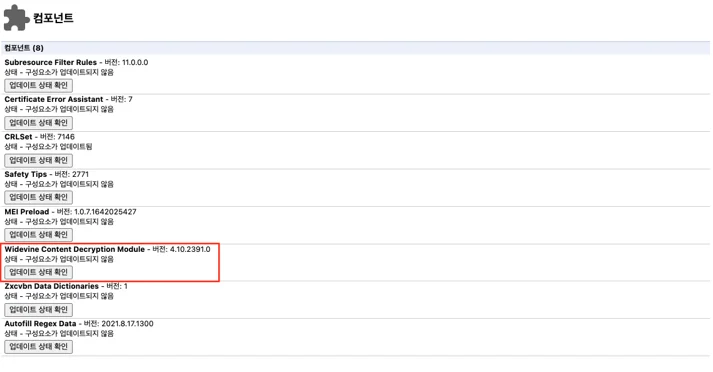
- Attempt multiple times until the update is complete, then restart the browser.